Weekly Review made easy(ier): The Power of Claude Cowork

For over almost two decades, my late Friday afternoons have been devoted to the weekly review — that ritual drawn from David Allen’s Getting Things Done methodology, where you step back, look at every open loop, and decide what truly matters for the week ahead. As a professor juggling a research program, an administrative portfolio, mentoring obligations, editorial duties, and the occasional plumbing emergency at home, the review is non-negotiable. Without it, things fall through the cracks. With it, I can enter Monday morning with clarity.

What has changed dramatically recently is how I conduct that review. While I still scroll through Reminders lists, I now have a scheduled Claude automation reads every one of my Apple Reminders lists, cross-references them against my week’s daily briefs (OCR’ed automatically from hand my written note, and produces a structured HTML report that I open in my browser each Friday afternoon. The entire process takes about two minutes of compute time and zero minutes of my attention until the report is ready.

The Problem That Needed Solving

Apple Reminders has been my capture system of choice for the past two years, moving away from Cultured Code Things. It syncs instantly across every device, supports Siri dictation, allows file attachments, recurring tasks, location-based tasks, and integrates well with mail rules, shortcuts and scripting. Over the years, I have accumulated between 33-35 active lists at any one time, spanning professional domains (Research projects, Conferences, Mentoring, Review-Referee, administrative-institutional lists), personal categories (Family, Personal, Maintenance), a Waiting For list, and soft lists I think of as “someday/maybe” buckets (Might like to read, Incubating, Ideation, …). On any given Friday, there are north of 400 open reminders distributed across these lists.

The difficulty is not the volume per se — it is the cognitive overhead of context-switching between domains, spotting items that have become time-sensitive since they were captured, and identifying which tasks align with future calendar entries (yes, there is an MCP server for Claude!!!) the strategic priorities I have declared for the current session and week. Doing this manually takes about 1 to 1.5 hours, depending on the level of activity during a given week. Doing it well required a good level of attention that can be hard to sustain at the end of an already long week.

The Architecture

My solution relies on three components that are already part of my daily workflow:

  1. Apple Reminders as the single capture layer. Every actionable items ends up here, initially in the Inbox list.
  2. Claude’s Cowork mode running on my Mac, with the Apple Reminders MCP (Model Context Protocol) connector granting read access to every list. The one used is the apple-reminders MCP server by Dhravya Shah,. It is a Node-based MCP server that interfaces with Apple Reminders (and Calendar) via AppleScript bridges on macO.S
  3. A scheduled task configured to fire every Friday afternoon. The task prompt instructs Claude to query all lists, retrieve both open and recently completed reminders, and generate an HTML report following a precise template.

The scheduled task is defined in a single natural-language prompt. There is no Python script, no shortcut chain, no Zapier integration. The prompt describes the report structure I want, the analysis I expect, and the formatting conventions to follow. Claude handles the rest — iterating through the API calls to Apple Reminders, performing the cross-referencing logic, and writing the HTML file to my working folder, where a macOS Folder Action can optionally open it in the browser.

What the Report Contains

The generated HTML report is divided into six sections, each serving a distinct purpose in the review workflow:

Section 1 — Empty Lists. Lists with zero incomplete tasks. This is a hygiene check: if a list has been empty for several consecutive weeks, it may be a candidate for archiving. The report flags stale lists with a recommendation.

Section 2 — Completed Tasks This Week. Every reminder marked as done during the past seven days, grouped by list, with summary statistics showing which domains consumed the most effort. This is the “what did I actually accomplish” mirror, surprisingly motivating on weeks when it felt like nothing moved forward.

Section 3 — #Project-Tagged Completions. A filtered view of Section 2, isolating only tasks that carry a #Project tag. This lets me track progress on declared multiweek initiatives without noise from routine operational tasks.

Section 4 — Upcoming #Project Deadlines. Any #project-tagged reminder with a due date falling within the next 14 days. When the horizon is empty, Claude flags it as notable and lists the next known deadline further out, along with a warning if major projects have no due dates at all.

Section 5 — Inbox Triage Suggestions. The Inbox list is where everything lands before being sorted. Claude examines each item, proposes a destination list, assigns a priority level (normal, high, urgent), and provides a one-line rationale for the suggested move. This is the section I interact with most actively — it turns the Inbox from a guilt-inducing pile into a decision queue.

Section 6 — Strategic Task Promotion Audit. This is the most analytically ambitious section. Claude cross-references my undated reminders (typically around 400 items across all lists) against two sources of declared intent: the semester-level Top 3 priorities and the weekly Top 3 priorities recorded in my Maintenance list. The output is a three-tier table. Tier 1 identifies tasks that directly operationalize a stated priority but lack a due date — the classic gap between intention and execution. Tier 2 surfaces items with approaching or overdue external deadlines (conference registrations, manuscript reviews, grant forms). Tier 3 highlights dormant tasks that have gained renewed relevance from themes discussed in my week’s daily briefs.

What I Have Learned

Three observations stand out after running this system. First, the value of the report is not in the data extraction — it is in the editorial layer. Claude does not merely list tasks; it produces rationales, flags contradictions between stated priorities and actual behavior, and recommends specific actions. That editorial judgment, grounded in the context of my actual task landscape, is what transforms a list dump into a decision-support tool.

Second, the system is remarkably low-maintenance. The scheduled task prompt has been revised perhaps four times since I first wrote it, mostly to add Section 6 and refine the triage heuristics. Because the prompt is natural language, the iteration is trivial — I describe what I want differently, and next Friday’s report reflects the change.

Third, there is a real psychological benefit to receiving the report as a document rather than interacting with it conversationally. The HTML file is something I can print, annotate, and file. It creates a weekly record — an audit trail of what was open, what was closed, and what was flagged. Over time, these reports have become a lightweight project history that no other tool in my workflow provides.

The Template

For those interested in replicating or adopting this approach, I have also included a PDF of the template (see above) showing the complete structure of the report with all six sections and their subsections. Of course all entries are fictitious, but the layout and section logic are identical to what Claude generates each Friday.
Freakonomics Podcast and Mr. Feynman

“I would rather have questions that can’t be answered than answers that can’t be questioned.”

― Richard Feynman

I recently discovered a new podcast called Freakonomics, which had an interesting question as title: Why Is There So Much Fraud in Academia?

But soon after moved on to three extremely interesting episodes called the Curious (part 1), the Brillant (part 2) and the Vanishing (part 3) Mr. Feynman. Even if you read the books, or just because you saw this guy playing bongo in the movie Oppenheimer, these provide an interesting look into Feynman’s life as seen by friends and his daughter.

Time tracking over an 18 months period: what was learned

“Your time is limited, so don’t waste it living someone else’s life.” 

– Steve Jobs

The COVID pandemic made many of us realize that we were spending a lot of time on things that brought very little in terms of quality of life or productivity. Transit time was a clear example, with many of us spending hours daily in traffic. This time suddenly became available, and we loved it. We discovered that tasks we had been putting off became “easy,” or at least easier to tackle. For me, the second item I was trying to get a handle on was the time spent on emails.

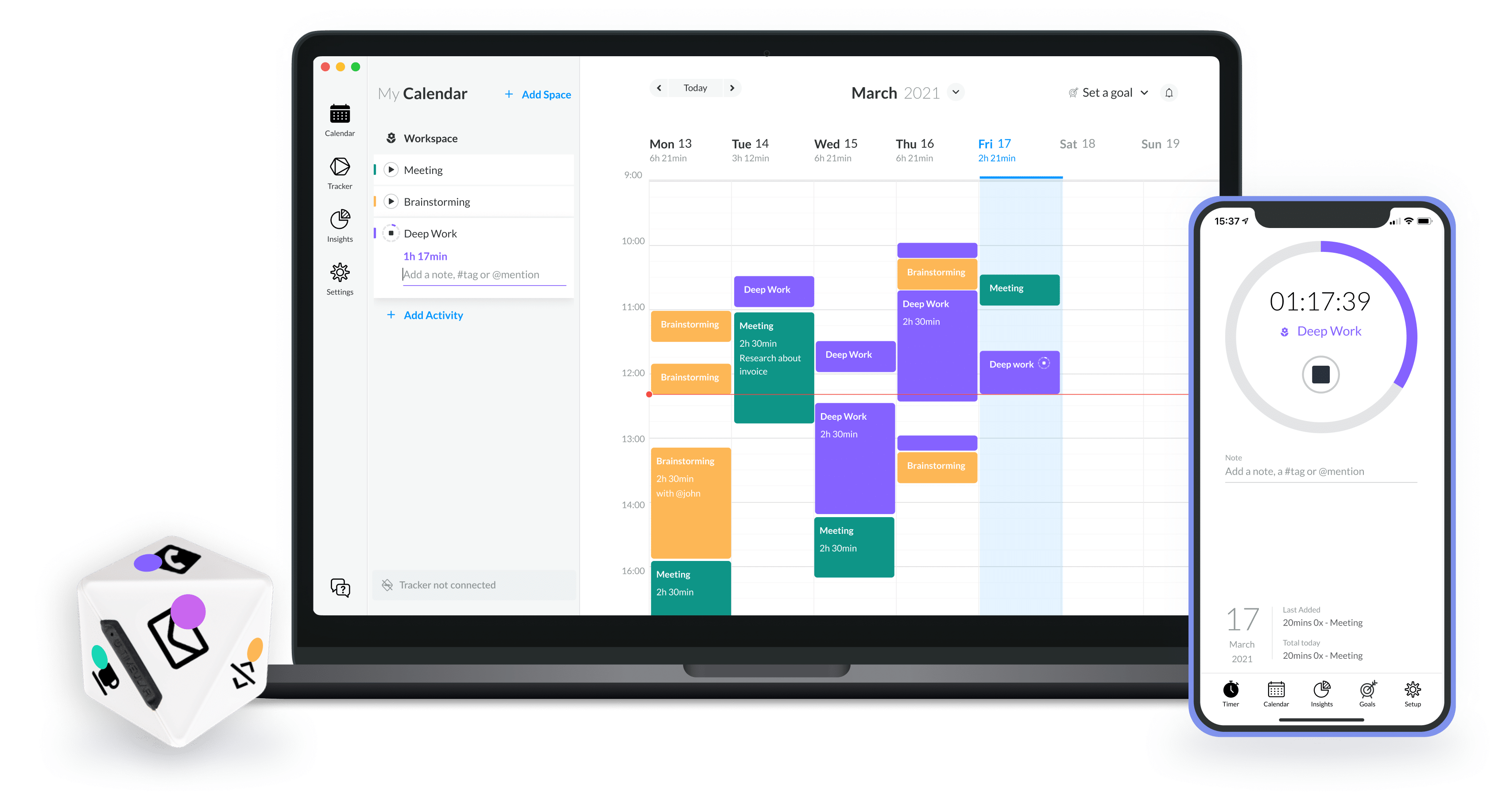
After listening to the Time and Attention podcast by Chris Bailey, I decided to try Timeular, which combines a physical device with software. The device is an eight-sided tracker that detects which face it is resting on. In the software, each face is associated with an activity. Tracking stops when the tracker is placed on its holder, though you can also manually enter time in the software.

After using it for more than 18 months, I wish it had 10 or 12 faces, as there are things I would like to track in finer detail (and I do not want to buy a second tracker). However, it is sufficient for a broad overview in an automated fashion.

I set up the tracker with the following categories:

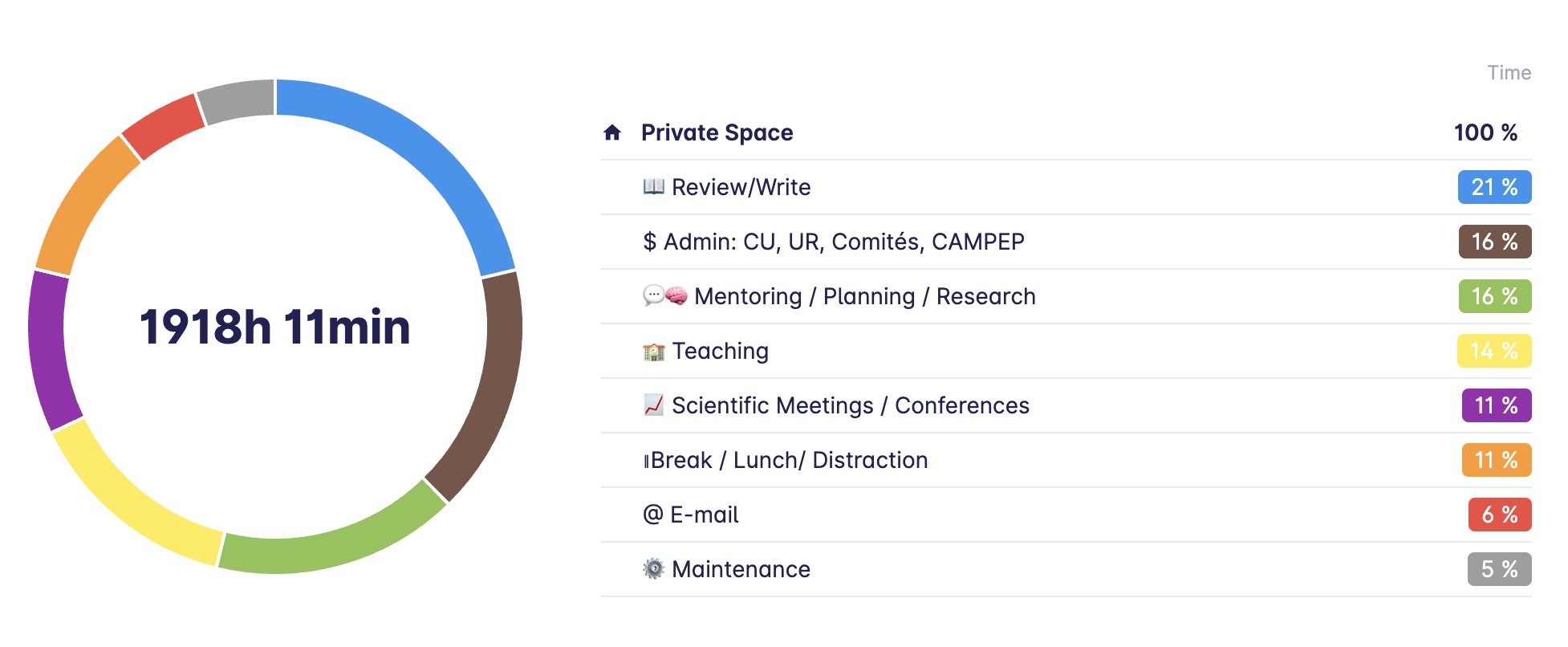
  • Review/Write: This includes all reviews of trainees’ manuscripts, master’s and PhD theses, as well as my own writing. I would prefer to have writing as separate categories.
  • Research, Planning and Mentoring: I combine these since much of the mentoring is linked to planning research projects, experiments, data taking, and analysis with trainees.
  • Teaching: This encompasses formal undergraduate and graduate teaching activities, including preparation, in-class time, and grading.
  • Email!
  • Maintenance: This primarily involves my weekly review and a few related tasks, such as annual reviews, all ensuring that my system works and is always up to date.
  • Administrative Duties: This includes institution committees, CAMPEP program-related activities, etc.
  • Scientific Meetings and Conferences, self-explanatory.
  • Break, lunch time and other distraction that arise during the working hours.

Note that I do not track my vacation time, transit time (though perhaps I should!), jogging/training time, screen time outside of work, social media time, etc. Timeular now has (in beta) an automatic tracking feature for the applications you use, in addition to the tracker itself. In the Apple ecosystem, Screen Time tracking across all your devices is also available.

In 2023, the first full calendar year I recorded, I logged over 1900 hours despite being on strike for several weeks and taking my full vacation allotment (23 days vacation + 12 days spread out through the years). It was an excellent year, with significant achievements including graduating 15 trainees, contributing to committees for 6 more, and publishing 14 manuscripts, one of them being an international report and another a first-in men clinical trial for a novel technology project I have been involved with since 2011.

For those who wonder about break/lunch, only 11% of these hours were in that category. This is on the low side for a creative field such as scientific research. Note that if you take a 5-minute break every hour, 1 hour for lunch and work 8 hours, this results in a 580-minute day, with 100 minutes (17%) being break/lunch time. According to one extensive time-tracking study, the top 10% most productive people take even more break with a 17-minute break for every 52 minutes of work.

Interestingly, teaching was only my fourth most time-consuming activity. This includes time spent in class as well as preparation and grading. This is because during the summer semester, when there is no formal teaching, I dedicate 100% of my time to other activities, primarily research. In the Fall and Winter semesters, the time dedicated to teaching increases significantly.

In 2023, I spent 6% of my time on emails, totalling 115 hours. Think about it, this is close to 3 weeks per year!  When I started time tracking, my average was nearly twice that. I very quickly changed my email habits by:

  • Avoiding emails in the evening (I really try to stick to this as much as possible).
  • Using a VIP list for urgent emails.
  • Reducing the frequency of checking my email during the day.
  • Avoiding emails on weekends.

Within a few weeks, my average email time reduced to an average of 34 minutes during workdays. This includes an end-of-day inbox cleanup, when quickly reply to things that take less then 2 min and transform into a task anything that needs more serious attention or work. I do a deeper cleanup of all of my inboxes, including e-mail, during my weekly Maintenance session. I further notice that my average tracking entry length when up from 38 min to 61 min, leading to better use of larger chunk of time during the day.

I schedule a Maintenance event in my agenda every Friday afternoon for 90 min. This is were I review all of my inboxes, get everything sorted in my task manager and document manager, review ongoing projects, Waiting For tasks, backburner projects, …,  review the previous week and plan the upcoming week. Some weeks, I need less than 90 min and others I will take a full 2h. I am also planning 1.5 days before the Holidays break for a full review and cleanup of all of my completed projects (archiving documents and e-mails associated with those projects as needed) and set the stage (high altitude planning) for the upcoming year. Overall, this account of 5% of my time (110h last year) but this is an investment and the return on that investment pays for itself.

In 2023, mentoring, research planning, and reviewing documents took up the largest share of my time at 37%. Including time spent at scientific conferences, this accounts for nearly 50% of my time in direct service to research activities.  I suspect that this will and should be true every year. This is also quite interesting as for a long time, I held a position where I was 50% clinical medical physicist and 50% research physicist. Moving to a university position, did not change the amount of time dedicated to research (and related activities) in the end…

Administrative tasks represented about 16% (or 307h) of my time in 2023. Some of these are built-in my job e.g. the direction of our CAMPEP program, our department faculty meetings and so on. 

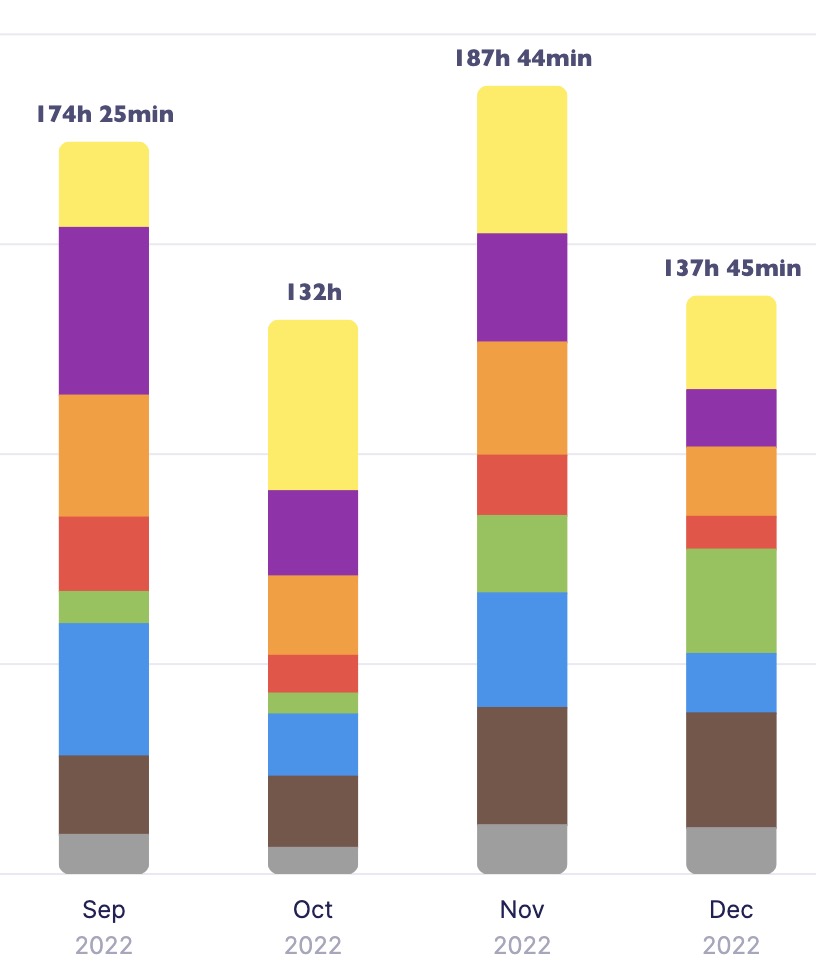
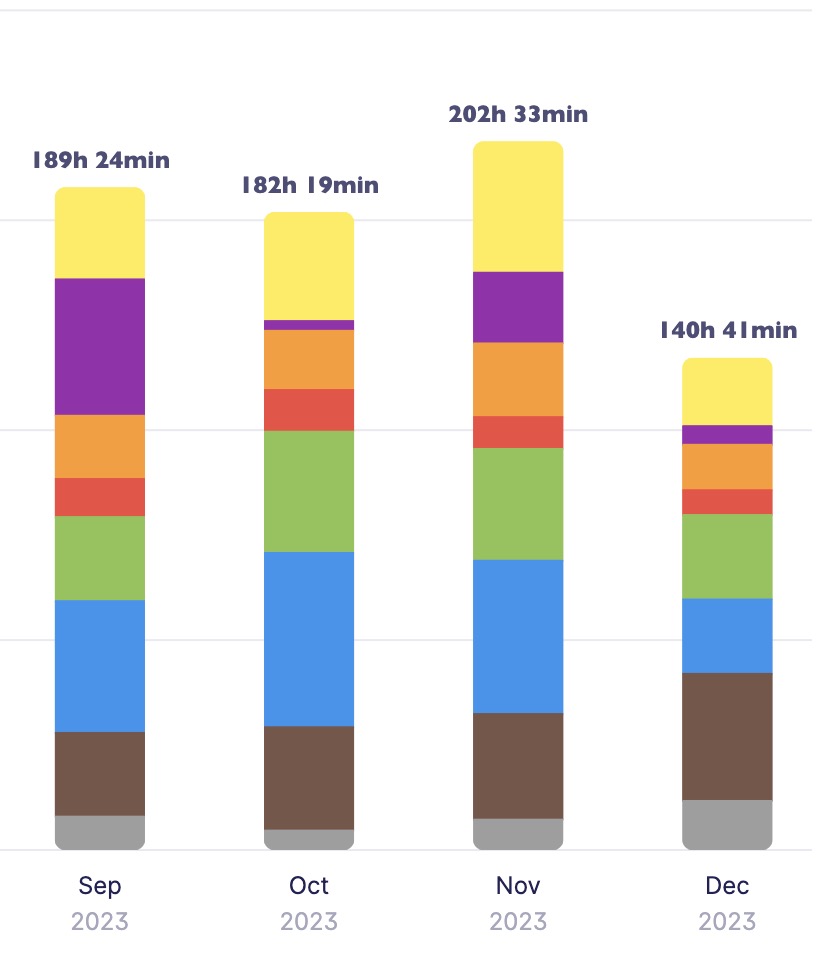
Comparing the Fall semesters of 2022 and 2023, I noticed a pattern. September (start of the school year for us in Canada) and November are particularly busy, with a higher workload due to grant proposals, recommendation letters, and administrative tasks. December is also intense due to year-end activities.

The number of hours/month logged in these 4-month periods is:

1- Higher on average than the rest of the year. Furthermore, September and November have the highest time logged in both years. The monthly average for the other months is around 153h/month (for 2023, the only full year I have). 

2- September (entrance, grants, letters, …) and November (everyone want their things done before the holidays and usually little happen past December 20th or 21st on the admin side, just the professors grading their finals) require a higher output, usually well above our work contract (on average this is always true, but still much higher)

3- October 2022 was low but there was also mortality on the family. In December, considering that I am out for a full weeks, it seems a lot had to be done in a short amount of time and this is true for both 2022 and 2023.

4- Notice how more hours logged in 2023 relative to 2022: record number of thesis to review and PhD thesis defence in addition to the normal workload!

In conclusion, time logging offers valuable perspective. It has helped me manage my email time more efficiently and recognize the actual hours spent “truly” working. As a creative professional, tracking time reveals that one might work fewer hours than perceived, given the brain’s limitations in sustaining concentration on creative tasks for extended periods. Since the pandemic, I have been trying to reduce my work week by concentrating on what I consider key tasks/projects, folding in the need for breaks. I have clearly failed in that regards for the Fall of 2023, but it was also an extremely satisfying four months 

Looking back at our 2023 Medical Physics Program

“In looking back, I see nothing to regret and little to correct.” 
John C. Calhoun

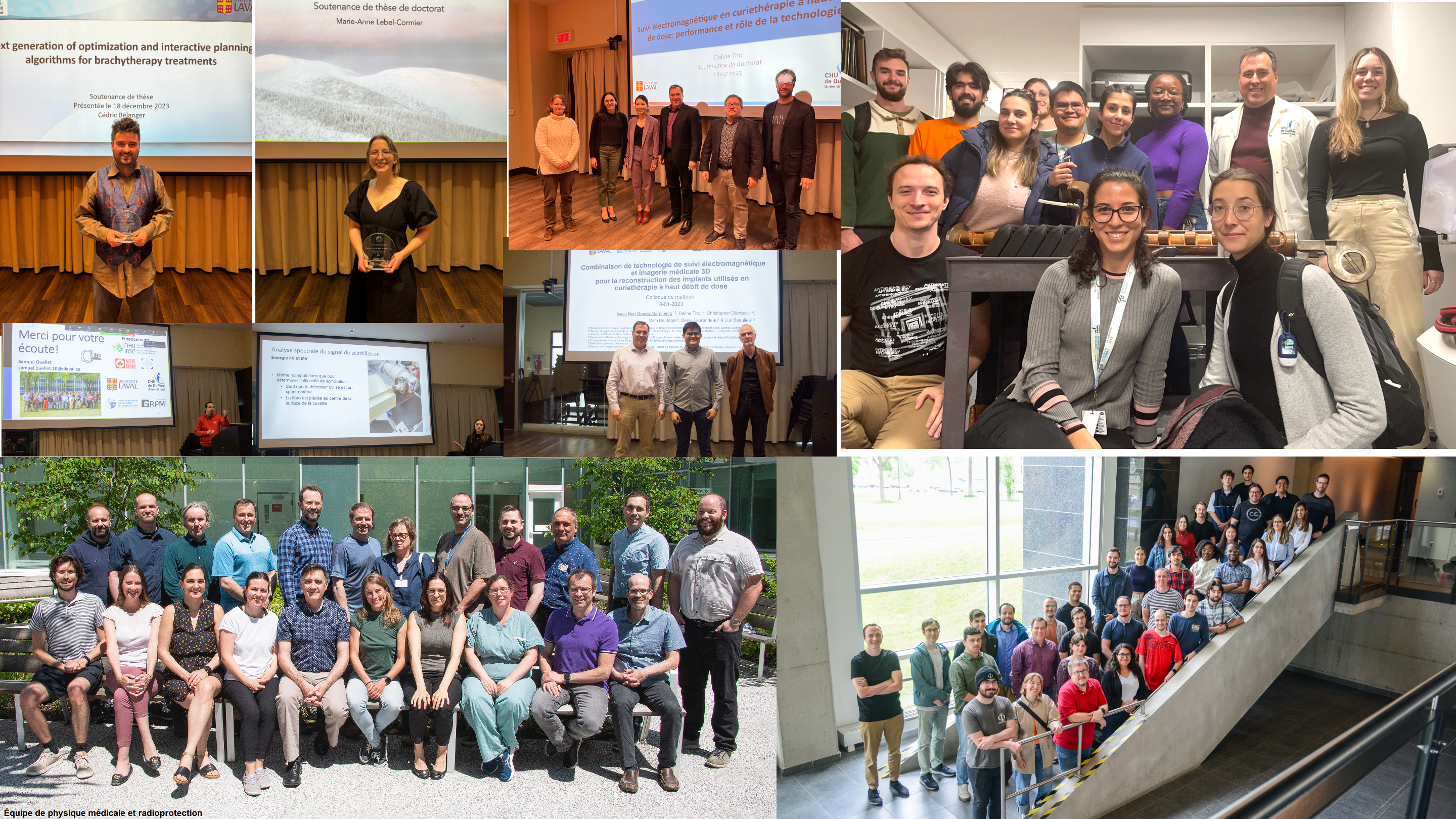
2023 was a spectacular year for our CAMPEP medical physics graduate program. We have graduated a record number of 13 students, 4 PhD and 9 masters (a few photos of PhD thesis defenses and master colloquium are given below). The majority in both categories were women, by the way. 

From 2011, the first year of accreditation, to 2018, only two out of 16 PhD graduates were women while master graduates were about 50-50. In the last 5 years, 8 out of 11 PhD graduates were women.  This year, the radiation physics graduate course was the most diverse ever with students from 6 countries and, for two of the last three years, a majority of women (cf. top right photo)!

This is interesting on many fronts. First, as a program sitting in the Faculty of Sciences and Engineering (we are part of the physics and physics engineering department), Medical Physics standout for being a diverse, inclusive and welcoming environment for graduate students. At the same time, it is recognized to be a tougher program than a regular physics master program due to its enhanced course curriculum combined to the same research requirement. Second, Quebec City is still not a major destination for immigration (while it is for tourisms) and immigration makes for only 7-8% of its population (will see the progression when we have access to the most recent statistics): harsh winter but mainly language (French) is a major barrier for many. So our natural catch basin, at least at the undergraduate level, from the Eastern Quebec is rather quite homogeneous to start with. 

I have been extremely happy by our out-of-country students’ ability to learn French quickly and being able to follow graduate courses and interact with our RadOnc department staff in French within their first year. Some have presented their master colloquium in French and even wrote their thesis in French!

Kudos to all of the Faculty (most appear on the photo in the bottom left) who contributed to this success.

Figure: Thesis defense and master colloquium (upper left quadrant), Fall 2023 radiation physics course (upper right quadrant), our university hospital medical physics teams and Faculty as of Summer 2023 (incomplete – lower left quadrant) and our trainees contingent from undergraduate students to postdoctoral fellows, Spring 2023 (lower right quadrant).

A new visual look for 2024

To start the new year afresh, I adopted a new visual look for this blog. I have a few new things I have tried that I will report on (time tracking, new task manager app trial, …) but I will also try and have a look at how the personal productivity app world change (…or not) since the publication of my digital office series in 2012!

I wish you all a very creative (and productive – in its holistic definition) year.

A Comparative Analysis of Cultured Code Things and Apple Reminders

Let’s start with a small disclosure: I have been a user of Things since version 0.7b, except for a short period of frustration with version 2 that sent me toward OmniFocus. However, hope was up with version 3 but did not move back until a truly usable version 3 became available. In the last 15+ years, I have also tried a few others, in particular Wunderlist (now MS To Do) that I recommended for years to students (as it was full-featured, free and cross platform) and ToDoist. 

Now, the latest version Reminders (7.0) has introduced a number of interesting features that makes Reminders an attractive task manager, at least enough to look at seriously. 

A reminder (no pun intended), Things 3 follows closely the GTD framework and have an organization structure that goes from higher altitudes containers to day-to-day doing starting with Areas, followed by Projects, … down to Tasks and Lists (sub-tasks). This can be done in Reminders but you have to decide if you can live with Lists as project holders OR use tasks as a project holders and sub-tasks for actual to do items. Here is a breakdown of the hierarchy for the two apps.

Things (succinctly): Areas (folder of Projects) -> Projects -> Headers (category dividers within a project)-> Tasks -> lists (sub-tasks). 

  • In Things only projects and tasks can have notes and URL. 
  • Projects, tasks and subtasks can be marked as completed. 
  • Projects and tasks can be made to repeat.
  • A task can very easily be converted to a project (while conserving its notes, URL and tags). Headers can also be converted to projects.
  • You can assign due date and reminder dates to projects and tasks. I do assigned due date to projects that have a well-defined ending but a tend to refrain to assign them to tasks. I do use reminders for key tasks, though.
  • You can search through all tasks by words but also sort by tag or a combination of tags.
  • Integration of calendar events in your Today list as well as the Upcoming list. This is extremely useful when planning ahead!
Things 3 default lists
Reminders 7.0 mix of default and smart (those with small gears) lists

Reminders (in a bit more details): Group (folder of Lists) -> Lists -> Sections -> Tasks -> Sub tasks. 

  • Only tasks and sub-tasks can have notes and URL.  In Reminders, you can also directly attach a photo, a file or scan a document. This is something still impossible to Things.
  • Only tasks and subtasks can be marked as completed. 
  • If a List is used to house a project, then you will need a “list info” task that can include notes and URL at the top if you want some context to your project. But such a task cannot sit at the very top of a List if Sections are used.  
  • Tasks and sub-tasks can be made to repeat.
  • A Completed Group could be created to house completed lists if lists are used as project containers. 
  • A task or a section cannot be converted to a list (or section to a task) from any menu options. 
  • You can assign a date (and a time), and also an early reminder date/time, a location reminder and even a reminder with using Message to tasks and subtasks.
  • Even better, you can enter a task in natural language and Reminders will recognize things like dates (either as specific dates or concepts like tomorrow, next week…) and so on automatically.
  • You can search through all tasks. 
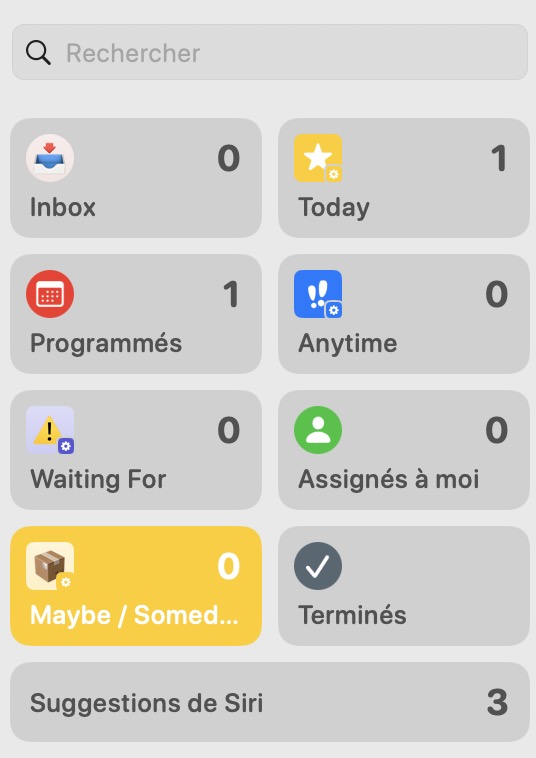
  • You can create customizable Smart Lists based on **multiple conditions**, including tags, flag, dates, location …! This allows you to create key Lists like Anytime (to mimic Things) or the GTD list Waiting For, which still does not exist in Things (but you can filter with a “Waiting” tag). It also means that you can have tasks (and sub tasks) displayed in multiple lists! You can also pin any list at the top to customize you app (it will follow across all of your Apple devices).
  • Did I say location-based reminders (!) as well as reminders when writing (via Apple Messages app) to someone. In Things, the only way to do this is to set-up a personal automation in Shortcut and go over this process for each location. Kudos to Apple for their implementation in Reminders.
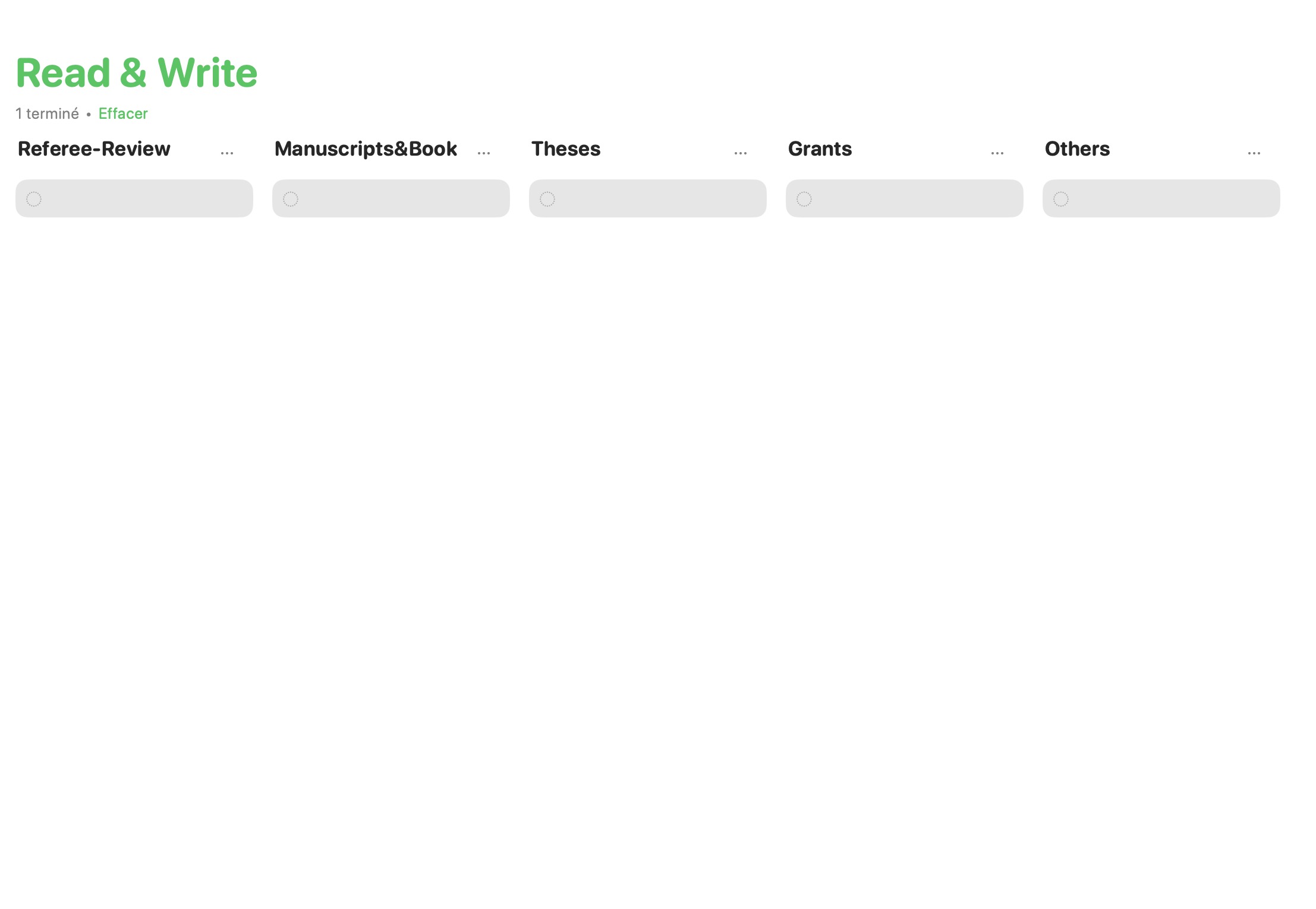
  • Allows for Kanban style (!) handling of tasks with the new column view. This is extremely useful for many things including what I call lists of never-ending tasks/projects (e.g. reading list, reviewing list, …) using Section as topics, tasks as projects and sub-tasks as tasks. Years ago, I developed something similar to extract information from Things SQLite database and this was pushed even further into KanbanView available in the Apple Store. Again, kudos to Apple for having this option in Reminders.
Column (Kanban) view of a List with Sections in Reminders
Things 3 Project with Headers

To learn a bit more have a look at this wonderful YouTube video by Peter Akkies that I discovered as I was ready to post: https://m.youtube.com/watch?v=nywKyvoLNPY

Clearly, this latest version of Reminders has a very interesting set of features, many beyond Things current options. But it also has a few interface quirks. 

  • The fact that it is not possible to easily transform a task to a project (List in Apple nomenclature) is one of them. 
  • Not being able to have URL and descriptive text for a List if used as Project holder is also a major drawback. 
  • When looking at tasks that can be done at anytime (i.e. Anytime List), in Things you see only the first task under a given project (with an option to see the rest). This really helps focusing when it is time to select what you will be working on today. In Reminders, you either have to collapse everything, and only see the project title, and expand and see everything. So if you have a large number of tasks and projects, this becomes extremely crowded and, let say, unproductive. 
  • Finally, not being able to check as completed a List makes the whole hierarchy less logical to use than Things or OmniFocus.

I must say that GUI-wise and ease of use, Things remains the best task manager out there. It has an extremely clean and sleek interface, making it very easy and fun to use (and look at). As a bonus, it is still available as pay once use “eternally” i.e. not a subscription model…at least for now (and new major versions happen only once every 5-6 years!).

In conclusion, if you have an Apple device, I think that you do not have any reason to pay for a task manager anymore. You already have everything you need available on your device out of the box. It offers enough features, even for the most demanding GTD followers, so it should easily satisfy the vast majority of users.