For over almost two decades, my late Friday afternoons have been devoted to the weekly review — that ritual drawn from David Allen’s Getting Things Done methodology, where you step back, look at every open loop, and decide what truly matters for the week ahead. As a professor juggling a research program, an administrative portfolio, mentoring obligations, editorial duties, and the occasional plumbing emergency at home, the review is non-negotiable. Without it, things fall through the cracks. With it, I can enter Monday morning with clarity.
What has changed dramatically recently is how I conduct that review. While I still scroll through Reminders lists, I now have a scheduled Claude automation reads every one of my Apple Reminders lists, cross-references them against my week’s daily briefs (OCR’ed automatically from hand my written note, and produces a structured HTML report that I open in my browser each Friday afternoon. The entire process takes about two minutes of compute time and zero minutes of my attention until the report is ready.
The Problem That Needed Solving
Apple Reminders has been my capture system of choice for the past two years, moving away from Cultured Code Things. It syncs instantly across every device, supports Siri dictation, allows file attachments, recurring tasks, location-based tasks, and integrates well with mail rules, shortcuts and scripting. Over the years, I have accumulated between 33-35 active lists at any one time, spanning professional domains (Research projects, Conferences, Mentoring, Review-Referee, administrative-institutional lists), personal categories (Family, Personal, Maintenance), a Waiting For list, and soft lists I think of as “someday/maybe” buckets (Might like to read, Incubating, Ideation, …). On any given Friday, there are north of 400 open reminders distributed across these lists.
The difficulty is not the volume per se — it is the cognitive overhead of context-switching between domains, spotting items that have become time-sensitive since they were captured, and identifying which tasks align with future calendar entries (yes, there is an MCP server for Claude!!!) the strategic priorities I have declared for the current session and week. Doing this manually takes about 1 to 1.5 hours, depending on the level of activity during a given week. Doing it well required a good level of attention that can be hard to sustain at the end of an already long week.
The Architecture
My solution relies on three components that are already part of my daily workflow:
- Apple Reminders as the single capture layer. Every actionable items ends up here, initially in the Inbox list.
- Claude’s Cowork mode running on my Mac, with the Apple Reminders MCP (Model Context Protocol) connector granting read access to every list. The one used is the apple-reminders MCP server by Dhravya Shah,. It is a Node-based MCP server that interfaces with Apple Reminders (and Calendar) via AppleScript bridges on macO.S
- A scheduled task configured to fire every Friday afternoon. The task prompt instructs Claude to query all lists, retrieve both open and recently completed reminders, and generate an HTML report following a precise template.
The scheduled task is defined in a single natural-language prompt. There is no Python script, no shortcut chain, no Zapier integration. The prompt describes the report structure I want, the analysis I expect, and the formatting conventions to follow. Claude handles the rest — iterating through the API calls to Apple Reminders, performing the cross-referencing logic, and writing the HTML file to my working folder, where a macOS Folder Action can optionally open it in the browser.
What the Report Contains
The generated HTML report is divided into six sections, each serving a distinct purpose in the review workflow:
Section 1 — Empty Lists. Lists with zero incomplete tasks. This is a hygiene check: if a list has been empty for several consecutive weeks, it may be a candidate for archiving. The report flags stale lists with a recommendation.
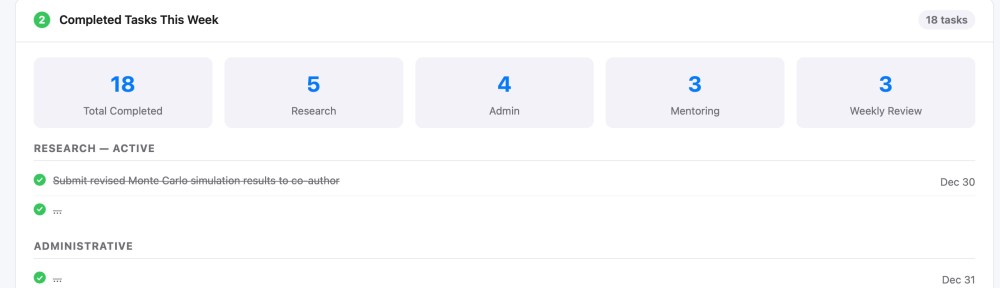
Section 2 — Completed Tasks This Week. Every reminder marked as done during the past seven days, grouped by list, with summary statistics showing which domains consumed the most effort. This is the “what did I actually accomplish” mirror, surprisingly motivating on weeks when it felt like nothing moved forward.
Section 3 — #Project-Tagged Completions. A filtered view of Section 2, isolating only tasks that carry a #Project tag. This lets me track progress on declared multiweek initiatives without noise from routine operational tasks.
Section 4 — Upcoming #Project Deadlines. Any #project-tagged reminder with a due date falling within the next 14 days. When the horizon is empty, Claude flags it as notable and lists the next known deadline further out, along with a warning if major projects have no due dates at all.
Section 5 — Inbox Triage Suggestions. The Inbox list is where everything lands before being sorted. Claude examines each item, proposes a destination list, assigns a priority level (normal, high, urgent), and provides a one-line rationale for the suggested move. This is the section I interact with most actively — it turns the Inbox from a guilt-inducing pile into a decision queue.
Section 6 — Strategic Task Promotion Audit. This is the most analytically ambitious section. Claude cross-references my undated reminders (typically around 400 items across all lists) against two sources of declared intent: the semester-level Top 3 priorities and the weekly Top 3 priorities recorded in my Maintenance list. The output is a three-tier table. Tier 1 identifies tasks that directly operationalize a stated priority but lack a due date — the classic gap between intention and execution. Tier 2 surfaces items with approaching or overdue external deadlines (conference registrations, manuscript reviews, grant forms). Tier 3 highlights dormant tasks that have gained renewed relevance from themes discussed in my week’s daily briefs.
What I Have Learned
Three observations stand out after running this system. First, the value of the report is not in the data extraction — it is in the editorial layer. Claude does not merely list tasks; it produces rationales, flags contradictions between stated priorities and actual behavior, and recommends specific actions. That editorial judgment, grounded in the context of my actual task landscape, is what transforms a list dump into a decision-support tool.
Second, the system is remarkably low-maintenance. The scheduled task prompt has been revised perhaps four times since I first wrote it, mostly to add Section 6 and refine the triage heuristics. Because the prompt is natural language, the iteration is trivial — I describe what I want differently, and next Friday’s report reflects the change.
Third, there is a real psychological benefit to receiving the report as a document rather than interacting with it conversationally. The HTML file is something I can print, annotate, and file. It creates a weekly record — an audit trail of what was open, what was closed, and what was flagged. Over time, these reports have become a lightweight project history that no other tool in my workflow provides.
The Template
For those interested in replicating or adopting this approach, I have also included a PDF of the template (see above) showing the complete structure of the report with all six sections and their subsections. Of course all entries are fictitious, but the layout and section logic are identical to what Claude generates each Friday.


Really interesting setup! I’ve been looking for a practical use case for the Apple Reminders MCP server, and this is brilliant. Section 6 (the Strategic Task Promotion Audit) is especially clever—bridging that gap between undated intentions and actual deadlines is always the hardest part of a manual review. Thanks for sharing the workflow. cowork how
LikeLike