LaCie Rugged 1 Tb USB3 / Thunderbolt External Drive: the Good and the Ugly

Whatever your have gone 100% digital or for occasional use, it is good practice to keep a copy of your important files “off site” from your main backup infrastructure. Mine is a 5-drive Drobo system used by time machine at work (set with 2-drive failure protection mode). So for portable backup, I bought a few years ago a 320Gb rugged LaCie triple interface (USB2/FW400/FW800) drive. Worked very nicely but got a little small. I also knew that I would change by MacBook Pro in 2012, with the expectation that USB3 / Thunderbolt would become the norm. My 15″ MacBook Pro Retina display fits the bill.

So I recently acquire the LaCie Rugged  1 Tb USB3 / Thunderbolt drive.

I decided to submit this drive to real-world read/write tests. By real-world, it means in my case backing-up and reading back files/folders.

The tests

  • I used three folders: one 9Gb composed mainly of mp3 and mp4 files, a 17Gb folder containing 12 MPixel photographs and finally a 109.8Gb folder composed mainly of standard and high-definition movies.
  • I used the terminal cp and time commands for these tests, namely: time cp -r <source> <destination>
  • Write tests = getting files from my Retina notebook and write them to the LaCie drive
  • Read tests = reading the files from the LaCie drive and to my MacBook Pro
  • Each test has been performed three times for each folder for a given interface (USB2, FW800, …)
  • I calculated the average values from the 9 individual values in the read tests for each interface. I proceeded similarly for the write tests.

For those who wonder, the Retina is using the latest generation SSD drive, so it is not a bottleneck in these tests!

The results (the good)

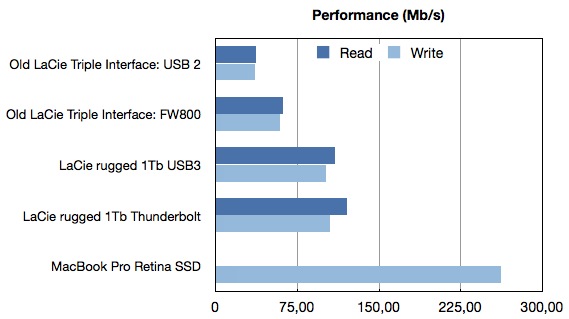
The figure below gives the write / read performance in Mb/s for my old 320 Gb triple interfaces LaCie starting at around 35 Mb/s using the USB2 interface and about 60 Mb/s with FW800. In comparison using the same terminal command as above to copy the same folders to another place on my internal SSD drive i.e. read from the SSD drive and write a new version of these folders also to the SSD drive gives over 266 Mb/s!

LaCie-Performance.001

First impression of the LaCie 1 Tb drive: it is much faster than the previous one thanks to the modern USB3 and Thunderbolt interfaces. The gain factor over the previous incarnation is between 1.7 to 3 times faster in these tests.

The surprise (the ugly)

The main surprise is the Thunderbolt interface is providing very little gain over USB3 in my real-world tests. In fact considering that the standard deviations are between 5 to 10% of the reported values shown in the figure, one can safely assumed that this drive basically offer the same level of performance for both interfaces.

In turns out that LaCie decided to use a 5400RPM drive for this model. I therefore must conclude that the hard drive rotational speed is limiting the Thunderbolt interface (maybe it even limits the USB3 interface). While marketing this drive as a Thunderbolt enable drive is a great publicity pull, the decision of using a sub-standard hard drive (in term of speed) is a very stupid one from LaCie in my opinion and deceiving for the buyer expecting to obtain significant advantage from the Thunderbolt port.

Conclusion

The new LaCie Rugged 1 Tb USB3/Thunderbolt external hard drive is a very capable, robust drive for anyone needing a drive that can travel and sustain some level of bumping. It is much faster than the previous triple interface LaCie rugged version. However even for its 220-230$ price point, do not expect the enhanced Thunderbolt speed. You will have to settle for USB3 speed.

On the go…

On the go…

Here is a few tools I really appreciate to carry with me on the go:
  • iPad: I do all of my reading and manuscript editing on it!
  • MacBook Pro Retina display: only on buisiness trip longer than a few days or if I need to finish that last presentation (Keynote for iPad works ok for simple presentations or when the presentation is ready. I still find it easier to build a presntation on the Mac).
  • Cables / Adaptors Organizer: I recently discovered the Coccon Grid-It. It is a simply, elegant and efficient organization system. The picture above shows a fully loaded “grid” with cables, adapters and so on. Just put it in your bag, very robust; nothing came out of it on my last trip (21 hours of plane, 28 hours of total travel and 4 airports later)
  • PlugBug: I really like Twelve South PlugBug power adapter for iPod/iPhone and iPad. The nice thing you can fit it on the top of the MacBook adapter so that it uses a single wall plug.
  • Logitec usb+laser presentation tool.
  • Bose QC 15 for those long flight. Very confortable and highly efficient noise cancelling. I found that it does make a difference on long flights. I did own cheap noise cancelling headphones for the past few years. I have to admit that the QC15 are really in a different class.
  • Digital camera: Just replace my iPhone3GS with a iPhone 5 two weeks ago (just in time for conference travels 😉 ). As advertised, I found that it covers my needs for pocket size camera and business trips photography very nicely. Of course not in the same category of a full-fledge Canon or Nikon camera but my pictures of the Sydney Taronga Zoo are really quite good.
  • Good old pen: you have to fill out those custom forms after all.

Here’s to the crazy ones…

“Here’s to the crazy ones. The misfits. The rebels. The troublemakers. The round pegs in the square holes. The ones who see things differently. They’re not fond of rules. And they have no respect for the status quo. You can quote them, disagree with them, glorify or vilify them. About the only thing you can’t do is ignore them. Because they change things. They push the human race forward. While some may see them as the crazy ones, we see genius. Because the people who are crazy enough to think they can change the world, are the ones who do.

– Apple Inc, Think Different “

I’ve said it a couple of times, I like computers and electronic gadgets, in particular those gadgets that do what they are supposed to do without getting in the way. You can just use them and they work (for a useful amount of time)!

I got my first computer in early 1983 (a small Radio Shack unit) followed a few months later by a C64. It was a great computer and learned a lot of programming from it. But when I saw a Mac and had the chance to work with one in school in 1985, I knew what a computer would looked like moving forward. This gaming changing business happened again a few times for Apple. Before the iPhone, most “smart” phones where really not that smart and the top of the line was the Blackberry (an e-mail on the go device). Even early version of Android was geared toward competing with the BlackBerry…2007 marked a pivotal year for smartphone, and nobody ever looked back (expect for those trying to revisit history after the fact). The same is true for tablet computing. Tablets have been there for a long time before the iPad but it was not even considered a factor in term of selling volume. Just a few years after the iPad, the tablet is now a bigger market than the “traditional” PC.

The most interesting things about all of the above is that when launched, all were declared DOA by most “market experts” : computers with GUI were toy computers just good for playing (and I am not even talking about the mouse…), iPhone was Apple biggest mistake since no one in its right mind would buy a phone that has no physical keyboard and buttons. The iPad was just a big iPod Touch, no way of doing real work on them. The truth is that all of the above broke or shifted a paradigm, a way of doing things that was so entrenched that they were seen as set in stone.

The same is true for many aspects of life, including scientific research. Once in a while, you get comments that your research program or project (or even paper) cannot be successful because that would mean the usual way of doing things, of thinking would have to change. Oh boy, that would be so impractical…

This leads me to the quotation used in the opening of this blog post and Steve Jobs.

Steve jobs passed away over one year ago (on October 5th 2011). Yet I find it fascinating how much it still written, especially online, about him even today. Some praise him as one of the genius of our time. Others, like to tell that he or Apple, in fact, didn’t do anything all. It does not really matter; the point is, as stated in the quote: “you can quote them, disagree with them, glorify or vilify them. About the only thing you can’t do is ignore them.”. Clearly, he was someone who still can’t be ignored 😉

Steve Jobs delivered a great speech at Stanford University, which is worth listing to:

Steve Jobs: How to live before you die | Video on TED.com.

Zotero on the go!

In the previous post I was describing the free Zotero scientific manuscript management software. Through a comment via this blog and others, I was pointed out that there are some solutions for access to your PDFs on the go.

Continue reading

Invest in a good manuscript (PDF) management system

If, as starting graduate students, you are following my first key advice of reading on a regular basis scientific manuscripts related to your field of research in general and your project in particular, you’ve probably reach an obvious observation:  you are collecting a large number of PDF files very quickly.

There are, of course, a few more observations to be made:

Continue reading

The highest data density storage achieved as of yet is done with DNA!

The state of the art 20 years from now might look like a combination of quantum computing and DNA-based high capacity storage 😉

Here is a great link from Engadget: Harvard stores 704TB in a gram of DNA, may have us shopping for organically-grown storage (video) — Engadget.