How is your New Year resolution(s) going?

“Your beliefs become your thoughts,
Your thoughts become your words,
Your words become your actions,
Your actions become your habits,
Your habits become your values,
Your values become your destiny.”
― Mahatma Gandhi

New Year resolution(s) has become part of the holidays festivities. It mark the end of the previous year and the willingness to have a better one. It certainly constitute an interesting opportunity to add or change something to your life. It could be anything: being better at writing scientific manuscripts down to losing weight 😉

In fact, most of the time what you are really doing by pursuing a new resolution is in fact modifying an old habit or adopting a new one. There are however some hurdles in successfully getting it done!

It reminds me of the new year special GYM program you have on TV, in the newspapers and so on. For as low as 30$/month (with a 12-month plans, less than 1$ per day!) you will loose weight and be in better shape guaranteed. Year after year the picture is the same (when I played volleyball on a regular basis, the gymnasium was right beside one of these training place), in January, the parking lot was completely full. By Valentine Day, you could see the difference and by Easter, you could tell that most simply stop going.

patience-yoda

There is in fact good behavioral reasons why failures happen (apart from serious health, addiction or other major life events). If you Google terms like “time to change a habit” or “how log to habit”, you get a lot of hits saying 21 or 30 days. If you truly want to change or achieve a new habit, the Star Wars wisdom seems to apply very well: “be patient young padawan”. This means you’ll have to stick to it.

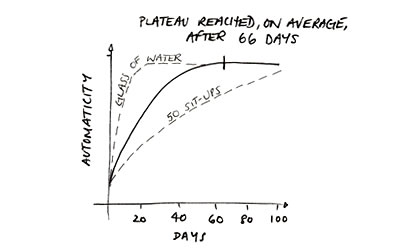
The figure below is from PSYBLOG and resumes the data presented by Lally et al in the European Journal of Social Psychology (a nice read by the way). You see that the time necessary to acquire or modify a new behavior is about 66 days, or two months, on average. However, the spread is important.

habit_graph2

A rule of thumb I use in talking to students, colleagues or friends is that if this is important to you, stick to it for 4 months, even if it make no sense at first and seems more work than your old habit. After 4 months, you are allowed to revert back if it does not work for you. Most of the time, you will not go back, at least entirely, to your old habit.

Of course by “sticking to it”, I really mean 100%. For example, I was helping a friend to the GTD method. The most difficult portion for that person was the weekly review. After two weeks, this person told me that it did not work and decided to stop. Of course it did not work, it was a major change to this person approach to task and time-management.

Another important advice, less is better. This means pick one thing at a time.

Human-computer interaction took a dramatic turn 30 years ago

Let’s go invent tomorrow instead of worrying about what happened yesterday.

– Steve Jobs

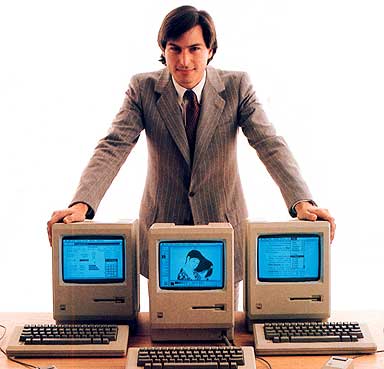
The release of the first Graphical User Interface or GUI for the masses happen on January 24th 1984 when Apple release the Macintosh. It deeply changes the face of the computer industry and how we interact with them.

jobs1984

In 1985, our school dumped its old language lab (with tape players) for a network of Macintosh. That same school year, we did a fully digital school year book of the 1985-1986 graduates. Photos were actually scanned using a manual B&W scanner . All texts and final page preparations were done on the Mac! It took years to replicate any of this on another platform, replicate what was done with such facility by a bunch of teenagers. A few years later at the University, one of the major student journals, using a “specialized” DOS program called Ventura Publishing, was still not able to do true WYSIWYG publications.

Of course the famous 1984 commercial, By Ridley Scott(!), also became one of the best commercial ever produced. You can also find the Steve Jobs’ Mac introduction to the world video.

At the time, I had gone through the very beginning of the general public personal computing first hand with the TRS-80, Apple IIe, Vic 20 and Commodore 64. But what we did with the school Macs was, for the time, really exceptional. It was obvious to me that this was the future of the PC. I went on to work on mainframes and UNIX-based workstations (SUNOS and Solaris, HP AUX, Linux, …) for most of my early researcher career. But OSX changed everything again, no more secondary Linux box necessary, I could have everything on a single platform: the best of both world. In that, Steve Jobs’ NEXT Computer was really the next step… The NEXT computer was to play a role in the development of the World Wide Web!

Smartphone camera can be used as a radiation monitor

Your smartphone is closer to a Star Trek tricorder than you may think!

Smartphones have really become portable, and wearable, computing devices. They can process loads of data, do real-time tracking (through GPS) and various motion tracking via integrated multi-axis sensors. Increasingly, auxiliary devices can also be attached and link to via Bluetooth 4.0. A group of researchers has recently demonstrated that the CMOS at the heart of the integrated camera of smartphones can be used as radiation detection monitors!

Dose-rate

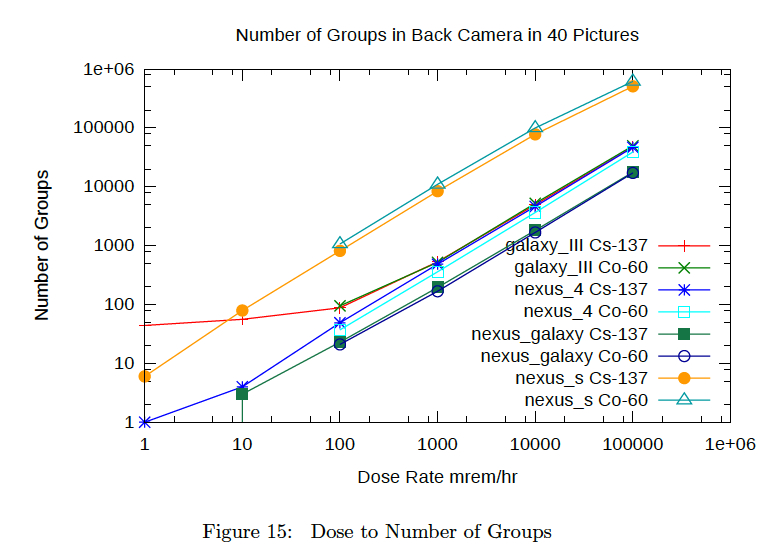
A recent paper by Joshua J. Cogliati, Kurt W. Derr, Jayson Wharton entitled “Using CMOS Sensors in a Cellphone for Gamma Detection and Classification”, and freely available on arXive, is demonstrating this of high energy gamma radiation and various Samsung. The idea is that when high energy photons (gamma radiations) hit the sensors, it generate high energy electrons that will leave fire the CMOS (or CCD) pixels that would otherwise have no signals. The produce “tracks” and the numbers of these tracks are representative of the amount of radiation measured by the device. This is shown on the figure above, Fig. 15 of that manuscript.

Beam me up Scotty!


The Ph.D.s Guide to a Nonfaculty Job Search

I have long heard and perpetuate to my students that if you are bright enough to successfully complete a PhD in the first place, finding a job which uses your hard learned skills is usually not a problem. In fact the unemployment rate for sciences and engineering PhD holders is usually quite low (low single digits in Canada).

Still, the Chronicle of Higher Education just published a piece entitled The Ph.D.s Guide to a Nonfaculty Job Search – Advice.

Getting your Inbox to zero quickly and easily with MailHub, an “AI” add-on to Apple Mail!

There are numerous tools and recipes to help you get your e-mail Inbox to zero. One popular choice is indev MailTag and MailActOn. The nice things about indev software is that they plugged right in Apple Mail. Mail Act On is very powerful but requires you to build and maintain all the rules or act on “actions” you create. Also like its use for files, tagging does have limits, in particular when you have a large number of them: it simply does not scale easily. Finally using the combination of MailTag and MailActOn to deal with and file e-mails is not highly efficient when compared the way I am filing my load of weekly digital documents using DevonThink built-in Artificial Intelligence (AI).

One option would be to throw all of your e-mails in DevonThink but Devon is not a Mail program. I also like having e-mails from all of my on-going projects live on the corporate (University) server: accessible everywhere and backup for me!

Here comes Dervish Software MailHub to the rescue. MailHub is a plug-in to Apple Mail that adds intelligent “DevonThink like” filing capability to all of your mailboxes. When I say all mailboxes I really means for all that you asked MailHub to index: Work computer, Exchange/IMAP mailboxes, local mailboxes (I do have over 20 years of e-mail archives of the projects I completed over the years), iCloud and GMAIL. No time spent to create rules or actions, no upkeep “cost”. To be fair it does more than that but the intelligent filing with either a single keyboard shortcut or a single click (you have the choice and the keyboard shortcut is user configurable) is what sold me.

Mailhub1

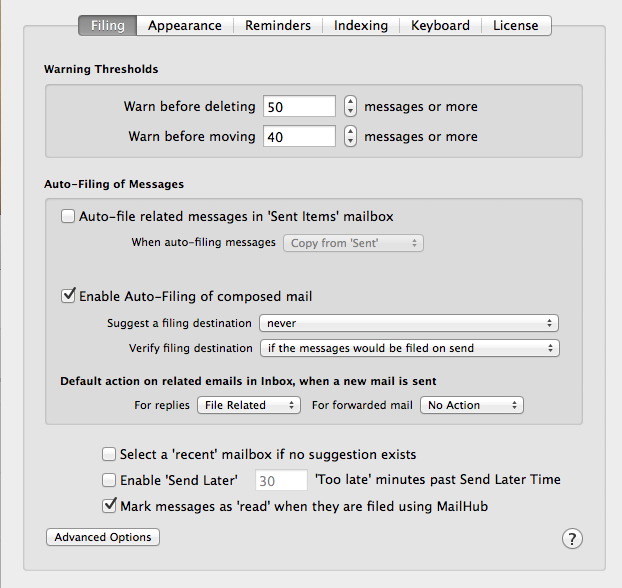
Figure 1 and 2: MailHub addition to Apple Mail preference pane (above) and its options (below)

MailHub2

According to the website, here is a list of what is possible to do:

  • Organise your email simply and easily using MailHub’s auto-suggest intelligent technology which suggests where to file your mail based on your previous email activity
  • File or delete emails individually, by thread or by sender in one simple process
  • Auto-file sent email to its parent mailbox
  • Create new mailboxes simply and organically when new filing categories arise
  • Set reminders for email related actions at the touch of a button
  • Preview changes before making them / undo changes as required

I will not go through MailHub option tabs as shown in the previous figure. Once you have MailHub install you will notice that Apple Mail now have a new toolbar. I set mine to blue (it is one of the appearance option) in the figure below so you can clearly see it. The most used button is indicated by the black circle. Clicking on it will automatically filed the current e-mail in the mailbox indicated by the black rectangle. Again that mailbox can be local or on a remote server depending on your indexing option. I set MailHub so that all mailboxes, local and server-based, are indexed.

MailHub3

Figure 3: New toolbar to Apple Mail.

If you do not like the filling option (mailbox choice) provided to you by MailHub (black rectangle in the above figure), you can 1) click on the pull down menu to get other choices. This is similar to DevonThink that provides you with its best guest on the top and other choices below it. 2) You can also type in a few letters of a mailbox name in the search bar that will appear at the top of the pull down menu to bring a mailbox to the top. 3) You can also create a new mailbox using the + button shown in the back rectangle region of the above figure. Notice also the arrow, it allows you to automatically jump to the selected mailbox and the home button (green circle) get you back to your Inbox.

Now you probably have picked up that the filling button, indicated by the black circle, also has a pull down menu. This is because you can file the current e-mail, file the entire e-mail thread or all e-mail sent by this specific sender. The delete button beside it (between the black and the red circles) have the same options i.e. selected, thread or sender.

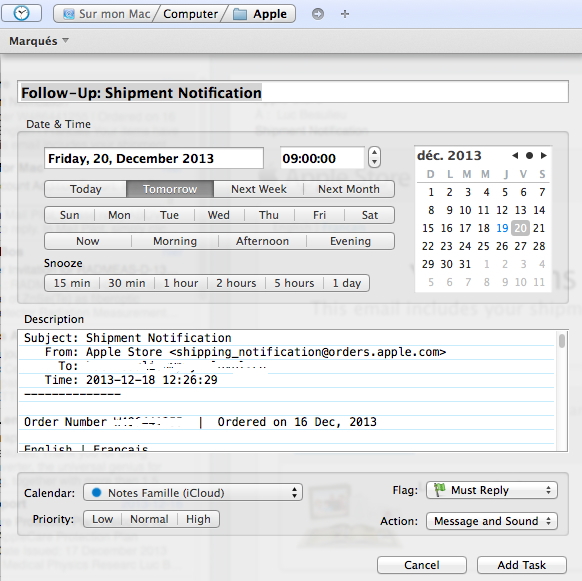
In the red circle, the little clock icon represent reminder options to be set on the selected e-mail. The available options are given in the figure below. It works with Reminder and iCal to set reminders at specific dates and times. An interesting feature is that the complete e-mail content is copied in the reminder  as a note. I set it so that the reminder is capture automatically by Things. It works flawlessly. The only major shortcoming to this is that a link back to the e-mail is not provided.I hope that this option is added by Dervish Software in a future release. As such, for now I much prefer using Things keyboard shortcut to create a quick entry in Things that does contain the link back to the e-mailing question.

MailHub4

Figure 4: MailHub reminder options, including setting flags, action and iCal/Reminder.

You will also notice a new toolbar addition when you write a new e-mail or reply to an existing one. This time you have three “send” mail options, the regular one (original top left icon = third button from the left on the new toolbar – Figure below) and two new options: 1) send e-mail and file the sent message (you get to set which mailbox using the pull down menu (“none set” in the image below) or 2) send e-mail and deleted the sent message. I really like the “send and file” option. For many e-mail threads I like to keep copy of my sent messages. This option allow you to skip CCing myself and then file that message: saving further e-mail processing (or taking manually the sent messages and file them, which would also take extra e-mail processing time). You will also notice the clock icon for setting reminder related to the e-mail you are about to send. This gives you the exact same options as explained before.

MailHub5 NewMail add on

Figure 5: New post/reply to existing post MailHub toolbar add-ons.

You can download and use MailHub free (full feature sets) for 30 days. I was sold after two days but mileage will vary. Conclusion, 19$ very well spent and, at least for me, much more efficient and cheaper that the combination MailTag and MailActOn. Getting my Inbox to zero has never been so quick and easy, especially when combined with SaneBox (that automatically sort close to 40% of my incoming e-mails out of my Inbox without any action on my part!).

Happy New Year!