Taking a clear stance on digital privacy…

A few years ago, users of Internet services began to realize that when an online service is free, you’re not the customer. You’re the product. But at Apple, we believe a great customer experience shouldn’t come at the expense of your privacy.

Our business model is very straightforward: We sell great products. We don’t build a profile based on your email content or web browsing habits to sell to advertisers. We don’t “monetize” the information you store on your iPhone or in iCloud. And we don’t read your email or your messages to get information to market to you. Our software and services are designed to make our devices better. Plain and simple.

– Tim Cook (View the whole text: Apple – Privacy.)


Only a company that make that much money selling hardware could take this stands: Google, Amazon, Facebook and the others simply cannot afford such commitment… and it is not their business model. You are their business model, you are their product!
Human-computer interaction took a dramatic turn 30 years ago

Let’s go invent tomorrow instead of worrying about what happened yesterday.

– Steve Jobs

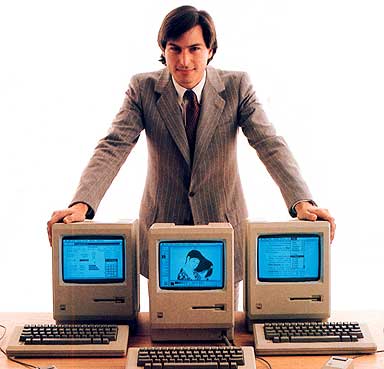
The release of the first Graphical User Interface or GUI for the masses happen on January 24th 1984 when Apple release the Macintosh. It deeply changes the face of the computer industry and how we interact with them.

jobs1984

In 1985, our school dumped its old language lab (with tape players) for a network of Macintosh. That same school year, we did a fully digital school year book of the 1985-1986 graduates. Photos were actually scanned using a manual B&W scanner . All texts and final page preparations were done on the Mac! It took years to replicate any of this on another platform, replicate what was done with such facility by a bunch of teenagers. A few years later at the University, one of the major student journals, using a “specialized” DOS program called Ventura Publishing, was still not able to do true WYSIWYG publications.

Of course the famous 1984 commercial, By Ridley Scott(!), also became one of the best commercial ever produced. You can also find the Steve Jobs’ Mac introduction to the world video.

At the time, I had gone through the very beginning of the general public personal computing first hand with the TRS-80, Apple IIe, Vic 20 and Commodore 64. But what we did with the school Macs was, for the time, really exceptional. It was obvious to me that this was the future of the PC. I went on to work on mainframes and UNIX-based workstations (SUNOS and Solaris, HP AUX, Linux, …) for most of my early researcher career. But OSX changed everything again, no more secondary Linux box necessary, I could have everything on a single platform: the best of both world. In that, Steve Jobs’ NEXT Computer was really the next step… The NEXT computer was to play a role in the development of the World Wide Web!

Apple A7 chip and iOS 7 thorough reviews available…

For those of you following the tech world, in particular computers, the announcement of the A7 64 bits SoC probably got a WOW out of you. It did for me. To me screen size, phone shape and the same has nothing to do with innovation. The issue of 4″ vs. 4.5″ vs. 5″ screens is like preferring a 13″ vs. 15″ vs. 17″ notebook or a 50″ vs. 65″ TV set. However, screen technology providing rendering image, resolution, contrast, color delivery (gamma, …), lower power consumption and the combination of all of them and more that is innovation. The same for custom, optimized and powerful SoC chips that drive these micro-computer… errr smartphone.

Quite frankly looking back at computing since the Z80, TRS-80 and commodore when I started on my first computers, the power packed in commercially available device of such as small format as the iPhone 5S, fitting in one’s pocket and working for hours before recharge, is absolutely amazing. In addition it delivered to the general public a 64 bits platform along with the OS and numerous apps (all of Apple apps on the iPhone 5S have been recompile in 64 bits). It might not register as a big deal to most phone users but it is from a technological standpoint. Also interesting that ARM was joint venture between Apple and two other companies in part to produce power efficient chips for the Newton, such a long time ago it seems.

A very interesting review, with benchmarks, can be accessed at AnandTech. We will certainly know more when someone actually get a layout of the chip (from high-res X-ray), but still very interesting. The review also look at the integrated camera and fingerprint system. Another interesting read is Daring Fireball takes on 5S new technologies.

Today was also the public release day for iOS 7 (like it or not!). Ars Technica published an in-depth-review.

Good reading 😉

LaCie Rugged 1 Tb USB3 / Thunderbolt External Drive: the Good and the Ugly

Whatever your have gone 100% digital or for occasional use, it is good practice to keep a copy of your important files “off site” from your main backup infrastructure. Mine is a 5-drive Drobo system used by time machine at work (set with 2-drive failure protection mode). So for portable backup, I bought a few years ago a 320Gb rugged LaCie triple interface (USB2/FW400/FW800) drive. Worked very nicely but got a little small. I also knew that I would change by MacBook Pro in 2012, with the expectation that USB3 / Thunderbolt would become the norm. My 15″ MacBook Pro Retina display fits the bill.

So I recently acquire the LaCie Rugged  1 Tb USB3 / Thunderbolt drive.

I decided to submit this drive to real-world read/write tests. By real-world, it means in my case backing-up and reading back files/folders.

The tests

  • I used three folders: one 9Gb composed mainly of mp3 and mp4 files, a 17Gb folder containing 12 MPixel photographs and finally a 109.8Gb folder composed mainly of standard and high-definition movies.
  • I used the terminal cp and time commands for these tests, namely: time cp -r <source> <destination>
  • Write tests = getting files from my Retina notebook and write them to the LaCie drive
  • Read tests = reading the files from the LaCie drive and to my MacBook Pro
  • Each test has been performed three times for each folder for a given interface (USB2, FW800, …)
  • I calculated the average values from the 9 individual values in the read tests for each interface. I proceeded similarly for the write tests.

For those who wonder, the Retina is using the latest generation SSD drive, so it is not a bottleneck in these tests!

The results (the good)

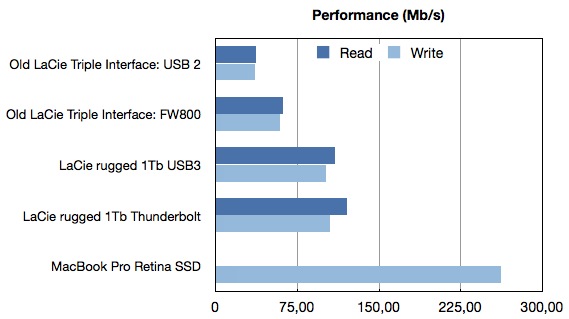
The figure below gives the write / read performance in Mb/s for my old 320 Gb triple interfaces LaCie starting at around 35 Mb/s using the USB2 interface and about 60 Mb/s with FW800. In comparison using the same terminal command as above to copy the same folders to another place on my internal SSD drive i.e. read from the SSD drive and write a new version of these folders also to the SSD drive gives over 266 Mb/s!

LaCie-Performance.001

First impression of the LaCie 1 Tb drive: it is much faster than the previous one thanks to the modern USB3 and Thunderbolt interfaces. The gain factor over the previous incarnation is between 1.7 to 3 times faster in these tests.

The surprise (the ugly)

The main surprise is the Thunderbolt interface is providing very little gain over USB3 in my real-world tests. In fact considering that the standard deviations are between 5 to 10% of the reported values shown in the figure, one can safely assumed that this drive basically offer the same level of performance for both interfaces.

In turns out that LaCie decided to use a 5400RPM drive for this model. I therefore must conclude that the hard drive rotational speed is limiting the Thunderbolt interface (maybe it even limits the USB3 interface). While marketing this drive as a Thunderbolt enable drive is a great publicity pull, the decision of using a sub-standard hard drive (in term of speed) is a very stupid one from LaCie in my opinion and deceiving for the buyer expecting to obtain significant advantage from the Thunderbolt port.

Conclusion

The new LaCie Rugged 1 Tb USB3/Thunderbolt external hard drive is a very capable, robust drive for anyone needing a drive that can travel and sustain some level of bumping. It is much faster than the previous triple interface LaCie rugged version. However even for its 220-230$ price point, do not expect the enhanced Thunderbolt speed. You will have to settle for USB3 speed.

Thinner, lighter and faster

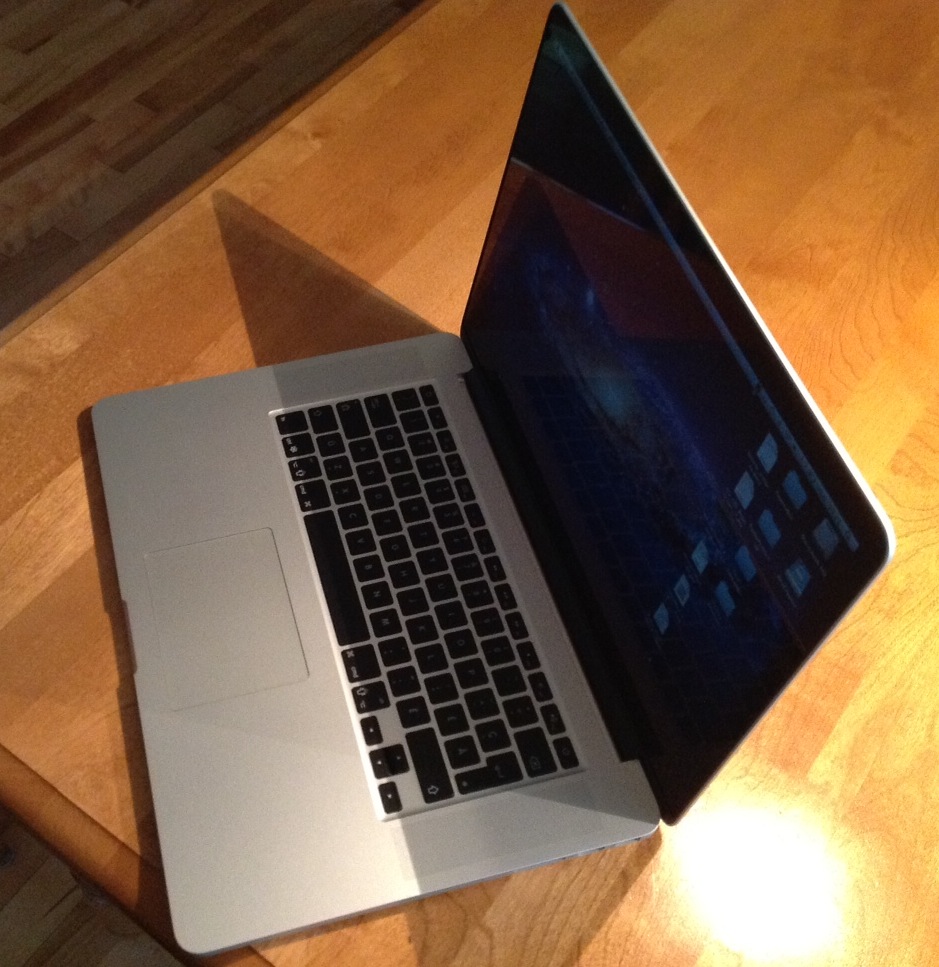
Just received my new workhorse, a brand new MacBook Pro Retina display. 2.7 Ghz Quad-core i7, 16 Gb ram and a large 750 Gb SSD drive 😉

So far, not only the display is quite amazing but the speed of the thing. Booting take less than 11 seconds thanks to the new generation of SSD drive used in this MacBook Pro. Get off the sleep mode is almost instantaneous. The screen remain visible even as you approach 180 degrees. The difference in weight with my 2010 MBP is obvious and this notebook is clearly thinner. I will get a few weeks of usage and report on the lack of DVD/CD drive (which I have not been using very often on my old MBP).

Digital Office I: Introduction and Hardware

Working efficiently in the digital world is not as easy as it sounds, in particular as you get more and more files to deal with. Furthermore, while eliminated paper sounds like an excellent (and green) idea, it is not obvious to fully to eliminate all of it and yet still be productive without putting too much time on the gadgets themselves. I am have been toying with the idea of going fully digital around 2009 by bringing my notebook with me everywhere, including meeting. The truth is that many people around the table find typing and looking at a computer while having a meeting quite impolite. I further find it impractical. However the coming of the iPad change all that. The next few posts will look into the digital workflow I settled in since then.

Continue reading