I will post more once I get to try them but version 3 for both Mac OS and iOS of Papers are available for download. There are paying upgrades.
Category Archives: Software
Apple A7 chip and iOS 7 thorough reviews available…
For those of you following the tech world, in particular computers, the announcement of the A7 64 bits SoC probably got a WOW out of you. It did for me. To me screen size, phone shape and the same has nothing to do with innovation. The issue of 4″ vs. 4.5″ vs. 5″ screens is like preferring a 13″ vs. 15″ vs. 17″ notebook or a 50″ vs. 65″ TV set. However, screen technology providing rendering image, resolution, contrast, color delivery (gamma, …), lower power consumption and the combination of all of them and more that is innovation. The same for custom, optimized and powerful SoC chips that drive these micro-computer… errr smartphone.
Quite frankly looking back at computing since the Z80, TRS-80 and commodore when I started on my first computers, the power packed in commercially available device of such as small format as the iPhone 5S, fitting in one’s pocket and working for hours before recharge, is absolutely amazing. In addition it delivered to the general public a 64 bits platform along with the OS and numerous apps (all of Apple apps on the iPhone 5S have been recompile in 64 bits). It might not register as a big deal to most phone users but it is from a technological standpoint. Also interesting that ARM was joint venture between Apple and two other companies in part to produce power efficient chips for the Newton, such a long time ago it seems.
A very interesting review, with benchmarks, can be accessed at AnandTech. We will certainly know more when someone actually get a layout of the chip (from high-res X-ray), but still very interesting. The review also look at the integrated camera and fingerprint system. Another interesting read is Daring Fireball takes on 5S new technologies.
Today was also the public release day for iOS 7 (like it or not!). Ars Technica published an in-depth-review.
Good reading 😉
Getting your e-mail Inbox sorted-out with SaneBox
I receive around 500 e-mails per week to my work e-mail account. About 40% of these e-mails are not “important” in the sense that they do not need any response or action from me. They are rather bulk emailing (yes even from my workplace!), news-related emails and so on. For the past 6 months, almost 10% of my e-mail comes from China and other places to “invite” me to participate to so-called scientific meetings in fields of research that are not even close to what I am doing. Finally of the remaining 60%, only a fraction needs a fast turn around. The VIP option of OS X Mail is certainly a step in the right direction but not full proof.
If you have been following my blog and read the Digital Office section, you know that I keep all of my on-going projects’ e-mails on the corporate (university) server and I link key folders and e-mails to my digital file management system (DevonThink Pro Office) and task manager (Things). I do follow GTD processes when handling my Inbox.
The problem with the low priority, bulk and junk emails is that corporate servers and Apple Mail screening cannot filter all of them properly. Sure you could create rules but you would have to create tens of such rules every week. This takes times and you have to manage those rules afterward. It is not very effective.
Last July, I discovered SaneBox. I started with the two weeks free trial and decided to stick with it since then. One of the thing I really like of DevonThink is the artificial intelligence (AI) used for automatic classification of files. It would be really nice if the guys at DevonTechnologies did a Mail plug-in to do the same with the tons of e-mails I have (no I do not want to throw my e-mails in DevonThink) but they are not. Welcome to SaneBox! SaneBox adds a layer of intelligent filtering (hope it is not NSA driven!) to your e-mails. It creates extra mailboxes. In my case, the figure below shows four of them: @SaneLater, @SaneBlackHole, @SaneNews and @SaneBulk. The others are mine and I use them for classification once dealt with in the Inbox.
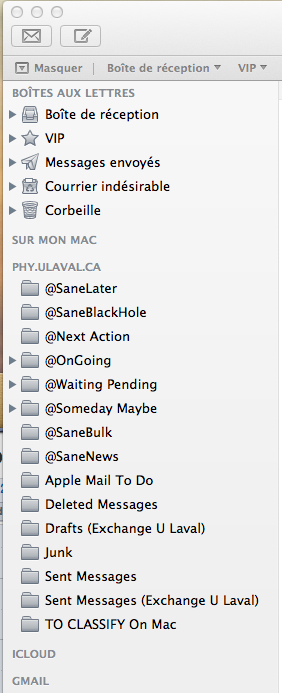
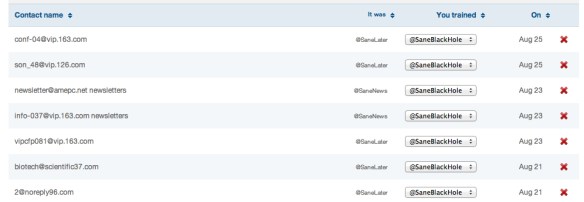
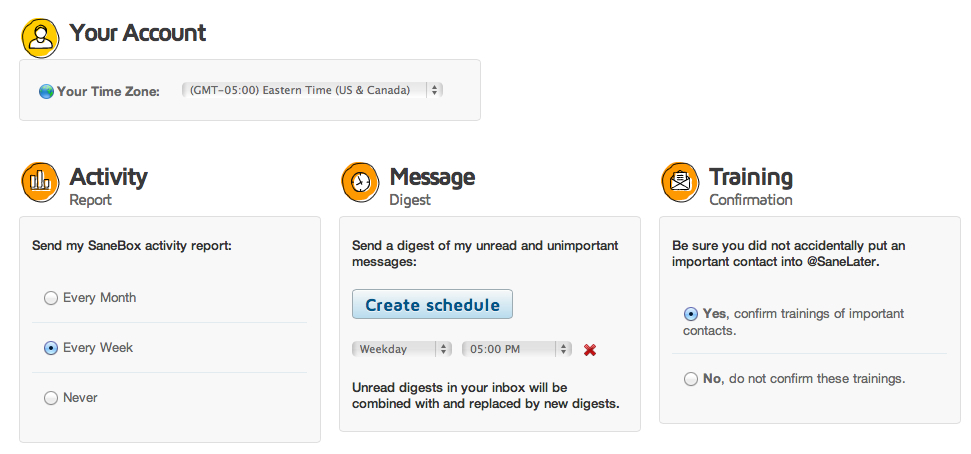
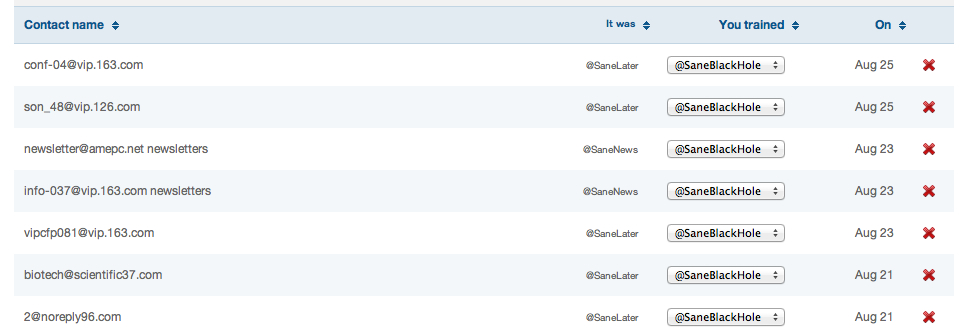
SaneBox redirection of e-mails from your Inbox to its associated folders is not only based on senders and subjects only but also on contents. So for example, once I have trained for a few these “strange” conference invitation e-mails to go to the Black Hole folder (self explanatory 😉 ), most of the new ones, even if the subjects or sender e-mail’s addresses are difference, end up there! You do have the chance to intervene and correct a mistake if needed. In fact you control how much feedback you received from SaneBox and the setting are quite simple. The two figures below shows my current settings and an example of e-mails moved automatically to the @SaneBlackHole box. The pop-up menu let’s you “trained” SaneBox behavior to your taste.
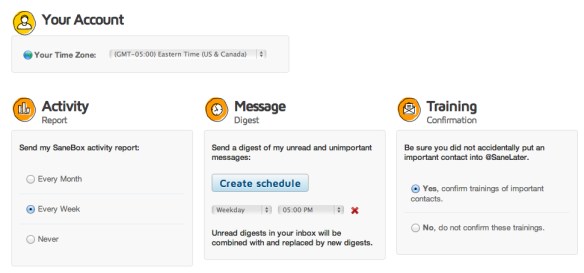
The @SaneNews and @SaneBulk folders are quite self-explanatory. Anything related to bulk e-mailing from work, associations, LinkedIn (and similar), software update alert all end-up in these folders, which you can read – and delete – when you want!
The @SaneLater is probably the most interesting. It is meant for all other e-mails that do not fits the other categories, that are kind of important but do not need your attention in the short term. For example, I received frequent request for graduate studies (a few per day). Since the senders are not usually part of my address book, these e-mails ends-up in the @SaneLater. Like the other folders, you can train them by simply dragging a message from one folder to the other. If you drag a message from the @SaneLater to your Inbox, SaneBox will understand that you want this person’s e-mail to be in your Inbox in the future and vice-versa.
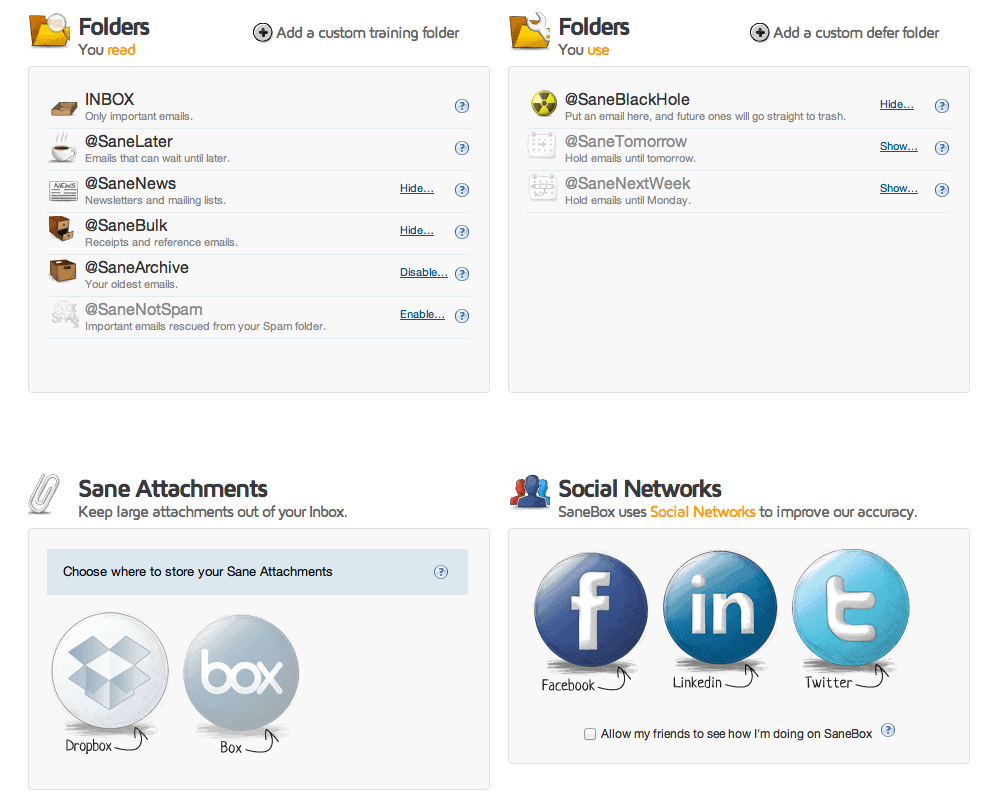
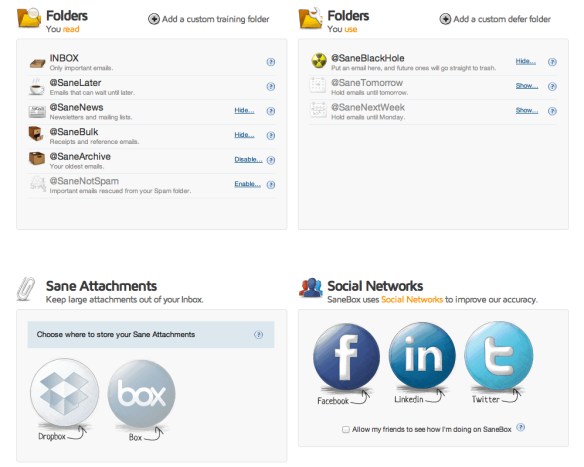
There are a few more folders you can have access to as shown below. I have not used any of them until now.
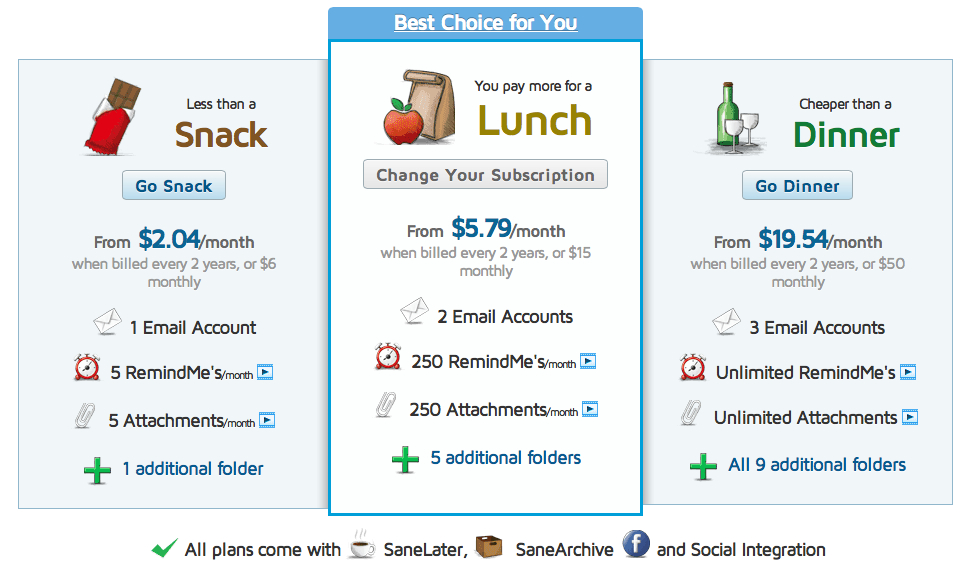
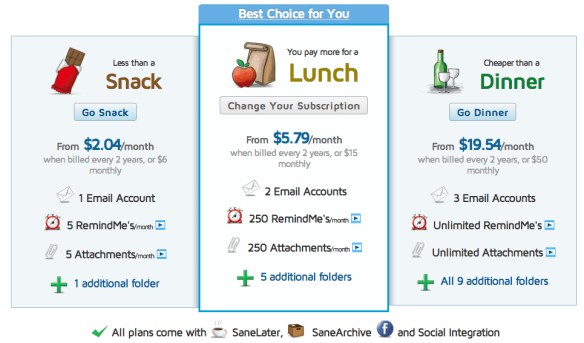
As for the price, on the SaneBox web page, you find three different packages based on the cost of a snack, lunch or dinner. I think my best package would be Lunch with 3 mailboxes. You will also note that you can automatically strip attachment to a dedicated folder on DropBox for example (Attachments option). I do not use this, since all files are transferred to DevonThink for me but this option might be interesting for some peoples.
In conclusion, SaneBox training is easy (dragging e-mails from one folder to another). I found SaneBox classification of e-mails quite efficient, you do not have to think about it after a week or two of training and it performs its work quietly in the background. Note that the extra mailboxes are created on the Server. So it is transparent with iOS Mail application. If you are interested in SaneBox, follow this link (and we both get a rebate!): https://www.sanebox.com/signup/fa39aa9fec

Mendeley is joining Elsevier…
Mendeley is a serious options for those looking at a PDF management (and in text citation) system for scientific literature. It is a rather good option to replace the old-timer Endnote.
Remember that EndNote is a product of Thomson Reuters; you know Web of Science, Impact Factor and so on.
Well, Mendeley is now part of the Elsevier family, another major player. It is going to be interesting where this will lead Mendeley in the longer term.
Read the link here: Team Mendeley is joining Elsevier. Good things are about to happen! | Mendeley Blog.
Alfred 2 is here!
For a long time, I used Quicksilver until it went un-supported for some time (or let’s say less supported for a while). Nowadays, I use Alfred. Alfred is Spotlight on steroid and makes multiple actions and workflows accessible via keystrokes. Version 2.0 is now out and Cult of Mac has a nice article: Great Workflows To Help You Get More Done With Alfred 2.0 [Feature] | Cult of Mac.
Online Collaborative Writing using LaTeX
LaTex / TeX has been a favourite of scientists for a long time. For many, TeX typesetting is considered to be producing the most beautiful and elegant documents, in particular when equations are involved. On OSX, I used over the years tetex and TeXLive in the past. Nowadays, MacTeX appears to be a popular package.
Beside the beautiful and elegant documents it produces, LaTeX uses only ACSII characters. It is thus highly portable and fully compatible across platforms. Therefore, documents can be written in any text editor (from the lowest common denominator such as vi to more elaborate one such as Emacs. On OSX, you will find the beautiful Aquamacs version of Emacs.
However, collaborative writing in LaTeX might not be the most intuitive function of LaTeX/TeX packages. And while I do hate WORD, its visual change tracking system makes document sharing and collaborative writing quite easy (compared to performing a “diff” command on two files and so on…If you do not know what is the “diff” command, it further proves the point).
Welcome to the free WriteLaTeX online collaborative environment. This new service was pointed out to me recently by a colleague at my institution. It is a web-based service and thus cross-platform and fully compatible with tablets (either iOS, Android or Blackberry) and no need to install a standalone distribution. Your working space is 100 Mb with the possibility to increase to 1 Gb (in steps of 50 Mb per referral…). Figures in JPG, PNG and PDF are supported as well as bibTeX bibliography style. Furthermore, writeLaTeX let you do Beamer presentations as well!
This image was taken from the writeLaTeX website and shown as a example of the feature sets available.
If LaTex is still in your arsenal of writing tools, have a look at writeLaTeX.