DevonThink Pro Office + BusyContacts = an efficient CRM solution for academia?

What does a Customer Relationship Management have anything to do with Academia? The blog Academic Workflow on a Mac makes a very good case for it…and I agree!


Today, I realized that you can copy DevonThink unique link of a group or an element within its database not just to Calendar/BusyCal or Things/OmniFocus but also to BusyContacts.

Continue reading

New academic templates for DevonThink Pro

I have been a user of DevonThink Pro Office for a number of years now and made it a central part of my digital workflow. Over time, I naturally my organization toward a project-based hierarchy, trying to self contains all key information regarding a particular project into a DTPO group and sub-group structure. So I keep what I call an Ongoing database, which have all of my ongoing projects: manuscripts and other documents being written, financed research projects and contracts as principal investigators, other research projects as co-applicants or collaborators, courses that I teach and so on. If it’s completed, it’s archived and thus pull put of the Ongoing database.
Capture d’écran 2014-05-10 à 12.43.15

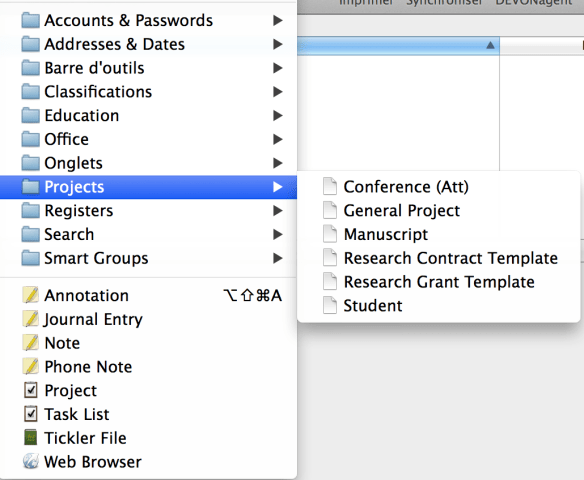
I have created a few standard templates containing a main folder (group) and sub-folders structure for a few key academic activities:

  • Research Grant
  • Research Contracts
  • General Research Project (not corresponding directly to the above two; can be personal!)
  • New Student
  • New manuscript
  • Conference (Attending/Presenting)

The following file (Projects) is a zip of a folder named Projects that contains these templates. Clicking the previous link  should already produced an unzip folder on your standard download folder. Simply drop the folder into ~/Library/Application Support/DEVONthink Pro 2/Templates.noindex. It will become available in the New from Template sub-menu of the Data menu.

I am quite interested in hearing if this is useful, if the structure of these templates are appropriate for your workflow and knowing about your own structure.

About the e-Office series!

In one place all the posts related to hardware, software and other considerations for setting up a productive scientific digital workflow.

I will add to it frequently (last update December 2018).


Enjoy,

Luc

Digital Office Part V: making it work!

So far, posts in this digital office series this blog have tackled the hardware selection and components, OSX and iOS software, and finally the inputs or “Inboxes”. In this post, I will try to illustrate how all the pieces come together and making it all work.

Continue reading

Digital Office part IV: Inboxes and various tips

In the previous posts, we went over the hardware requirements and selection, software and finally mobile software. It is now time to address the sources of digital documents, the true inputs of the digital workflow.

Not so long ago, there was a single inbox for all incoming “stuff” that requires your attention. Stuff is here define as anything that needs for you to decide what to do with it, including throwing in the garbage. In the analog world, that single inbox was the good old paper tray: correspondence, various documents, business cards, memos, telephone notes… everything ended-up there for further processing.

Continue reading

Digital office part III: mobile software

Previous installments:

Part I: Introduction and hardware

Part II: Mac Software

Part III: Mobile Software

Continue reading