Taking a clear stance on digital privacy…

A few years ago, users of Internet services began to realize that when an online service is free, you’re not the customer. You’re the product. But at Apple, we believe a great customer experience shouldn’t come at the expense of your privacy.

Our business model is very straightforward: We sell great products. We don’t build a profile based on your email content or web browsing habits to sell to advertisers. We don’t “monetize” the information you store on your iPhone or in iCloud. And we don’t read your email or your messages to get information to market to you. Our software and services are designed to make our devices better. Plain and simple.

– Tim Cook (View the whole text: Apple – Privacy.)


Only a company that make that much money selling hardware could take this stands: Google, Amazon, Facebook and the others simply cannot afford such commitment… and it is not their business model. You are their business model, you are their product!

Privacy, convenience, freedom and security or Android as the biggest trojan horse of all time

There was a very nice article recently following the first year after the revelations of Edward Snowden on how it become really easy even for regular citizens to “track” someone online. While all of this NSA business is often link to a debate of freedom vs. security, the biggest concerns should maybe not be NSA but the new Kings and Monarchies of our time aka (some) mega corporations.

Theprocessionofthetrojanhorseintroybygiovannidomenicotiepolo

We have hear and seen repeated for a long time the quote of Benjamin Franklin on freedom vs. security. However a more pervasive attitude is at play, and I must say that I am playing it like many others to some extent: giving away (some of) my privacy for convenience. One can ask how far would it go?


Things were looking to go better when Apple announce iOS8 and OSX 10 in which extra layer of security was added, going all the way to even hide your critical data from Apple itself (so employees or external agencies could not get their hands on it!).  Apple will also add MAC address randomization so you cannot be tracked without your consent as you get into various Wi-Fi zones.


Since then three announcements, each at 180 degrees from Apple, appears to decrease privacy significantly for, in principal, added convenience:


Each of the above announcements means that these companies will collect more information on you and in the end will know more about your general and detail behavior that even you can recalled from memory. The quote from Google Android Chief is quite explicit about this; they want to know where you are and what you do in real-time, all the time…


It turns out that the Android is becoming the biggest Trojan Horse virus of all time. First it is “free”, second it is adopted willingly and third Google is at the receiving end of all that information. It is the free part that is the central issue. The truth is than Android is not free. it pays itself by collecting your personal information…and that information by itself and aggregated by categories is extremely valuable to Google and to any one it see fits to share it with or sell to. Google business model is to sell advertising i.e. to sell the best “picture” you at any given point in time to others.


In fact, one might contend that receiving these so-called “free” software and hardware is probably not a strong enough retribution for the worth of your personal information: you are really worth more then you think and are probably being exploited without realizing it.


The scary part is to understand how wide is the gap between total lost of privacy and that of freedom? The next few years will be interesting.

New academic templates for DevonThink Pro

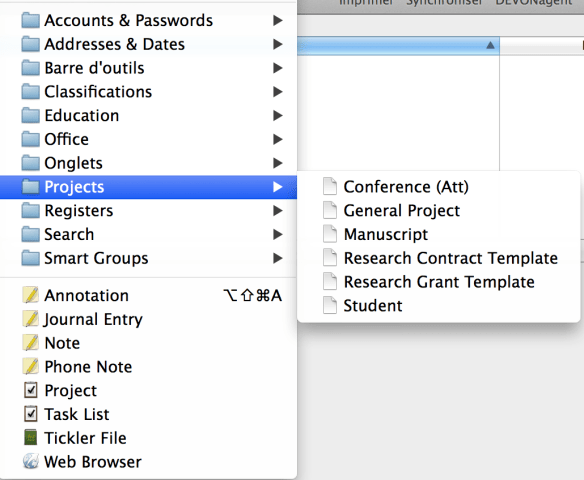
I have been a user of DevonThink Pro Office for a number of years now and made it a central part of my digital workflow. Over time, I naturally my organization toward a project-based hierarchy, trying to self contains all key information regarding a particular project into a DTPO group and sub-group structure. So I keep what I call an Ongoing database, which have all of my ongoing projects: manuscripts and other documents being written, financed research projects and contracts as principal investigators, other research projects as co-applicants or collaborators, courses that I teach and so on. If it’s completed, it’s archived and thus pull put of the Ongoing database.

Capture d’écran 2014-05-10 à 12.43.15

I have created a few standard templates containing a main folder (group) and sub-folders structure for a few key academic activities:

  • Research Grant
  • Research Contracts
  • General Research Project (not corresponding directly to the above two; can be personal!)
  • New Student
  • New manuscript
  • Conference (Attending/Presenting)

The following file (Projects) is a zip of a folder named Projects that contains these templates. Clicking the previous link  should already produced an unzip folder on your standard download folder. Simply drop the folder into ~/Library/Application Support/DEVONthink Pro 2/Templates.noindex. It will become available in the New from Template sub-menu of the Data menu.

I am quite interested in hearing if this is useful, if the structure of these templates are appropriate for your workflow and knowing about your own structure.

Office for iPad: too little, too late!

Microsoft announced today that they are releasing office for iPad. If all you want to do is see your files or display you PPT, the apps are free. If you want to be productive i.e. create or edit…you will have to shell-out the Office365 subscription cost. Really! And that is for a product that is stuck with OneDrive and SharePoint.

If you buy a new iOS device or a new OSX device, you are already better served with the free iWorks suite. For most users, this is also more than enough. Frankly, Keynote is so much better than PowerPoint (which on my Mac regularly crashes or corrupt its own files). WORD is OK for simple document, here simple meaning not too large or complex. Otherwise, again on OSX be ready for regular crashes on large and complex WORD documents (lots of sections with tables, figures and so on). Writing a PhD thesis on WORD is simply pure torture. Students should be advised to learn LaTeX right off the bat.

If you are truly working cross platforms and are interested in true real-time shared editing, free Google Drive is actually quite impressive (never thought I would say that of the (evil) Google!) and light years ahead of clunky SharePoint for collaborative work. Tested in a room with peoples on Windows, OSX and iPad all accessing the same “WORD” document for editing. Works like a charm! Did I say it is FREE?

Finally, OpenOffice is an acceptable, free replacement. The issue is for it to be efficient, everyone in your work entourage needs to adopt it. Otherwise, also works nicely.

In other words, unless forced by a stone age IT department to have Office for iPad on your device, you probably do not need it.

Two or more Dropbox accounts simultaneously on your Mac, it’s possible and easy!

Dropbox is a great tool for keeping certain documents accessible from everywhere (provided you have an internet connecting!). It is also a very nice cross platform collaborative tool. In the past, I have created specific folders that I share with collaborators across the globe. Recently, something different presented itself: as part of an important international project I am participating in, a specific (free) Dropbox account was created.

Of course, you can access both accounts from a web browser but the OSX Dropbox application does not provide for multiple accounts simultaneously. Daniel Mann posted sometimes ago a great solution to this problem on his Blog theTerran. It used Apple’s Automator to create two or more instances of the Dropbox application all running in parallel. If you look at the figure below you can see the toolbar from my Mac having two instances, the color one is my regular Dropbox account and the B&W one is for this special project. Both folders reside side-by-side on my Mac 😉

two-DropBox

It takes no more than a few minutes to go through the step-by-step instructions. Have fun and visit Daniel’s blog!